

How to Build an AI Employee That Works 24/7 for Your Business
Listen: How to Build an AI Employee That Works 24/7 for Your Business
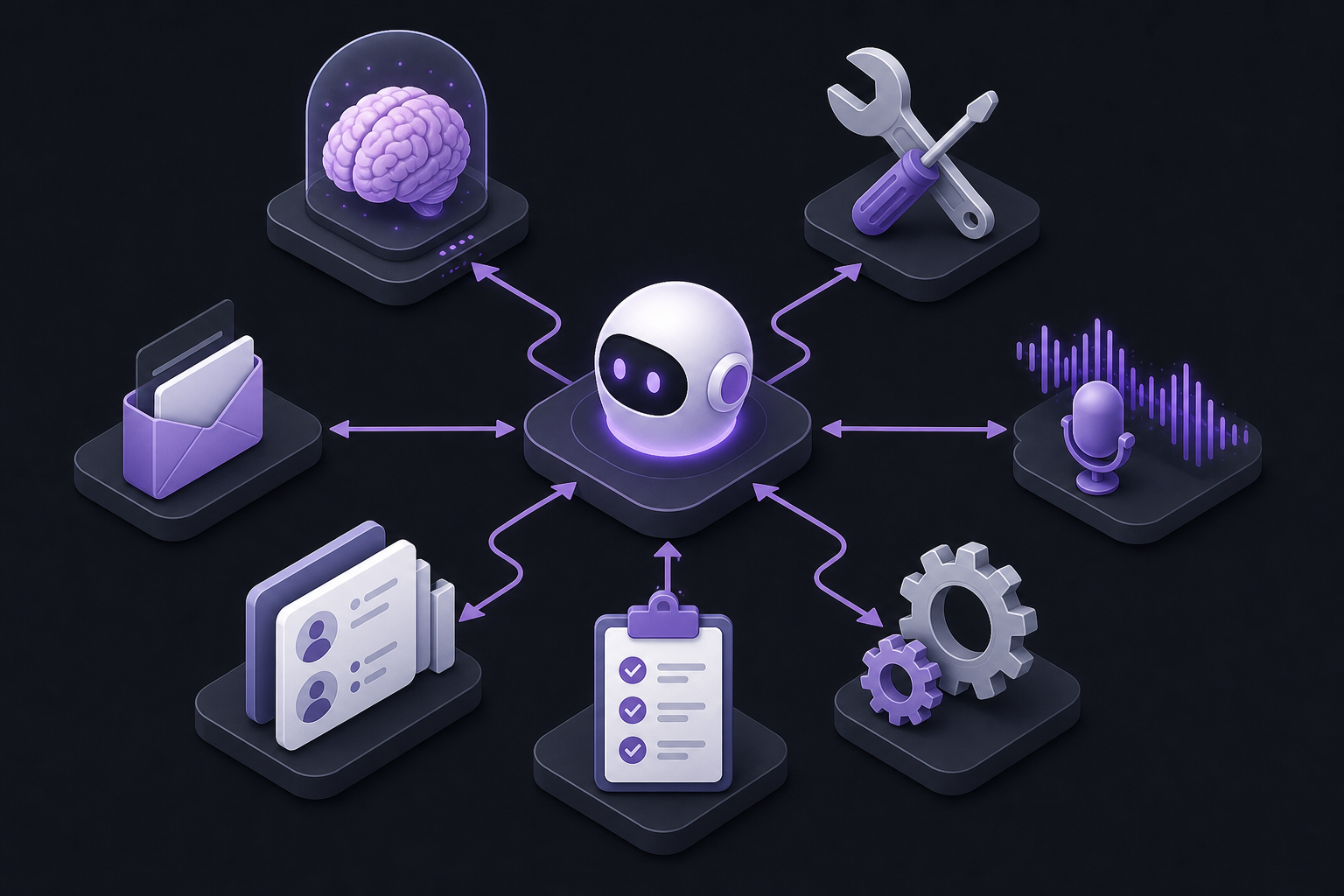
Businesses do not need more "AI chat windows." They need an AI employee: a digital teammate that remembers context, uses tools, follows SOPs, talks to customers, updates the CRM, and keeps working after everyone logs off.
That is why searches for AI employees, AI agents, and autonomous assistants keep rising. The promise sounds futuristic. The implementation is more practical: combine memory, tools, voice, automation, email, CRM, and documented SOPs into one reliable operating loop.
This guide is a builder playbook. You will not invent a sci-fi robot. You will assemble a system that handles defined jobs 24/7—lead intake, follow-ups, ticket triage, meeting prep, research handoffs, and status updates—while humans keep judgment, relationship work, and edge cases.
What an "AI Employee" Actually Is
An AI employee is not one model. It is a stack with clear responsibilities:
- Memory — what it knows about your business, customers, and past decisions.
- Tools — what actions it can take in real systems.
- Voice — how it speaks on calls, audio, or voice channels.
- Automation — how work triggers and moves without manual babysitting.
- Email — how it communicates asynchronously at scale.
- CRM — where work and relationship state live.
- SOPs — the rules it must follow so quality stays consistent overnight.
If any piece is missing, the "employee" becomes a toy. Chat with no tools cannot act. Tools with no SOPs create risky automation. Automation with no CRM creates orphaned work. Voice with no memory sounds smart and still forgets the customer.
Start With One Job Description
Hire the AI for one role first. Good first roles:
- Inbound lead qualifier and meeting booker.
- Customer support first-responder with escalation rules.
- Sales follow-up assistant for cold and warm leads.
- Operations coordinator that moves data between apps after forms, orders, or tickets.
- Executive admin that prepares briefings, triages inbox, and schedules work.
Write the job like you would for a human hire:
- Mission:
- Tools they can use:
- What they can decide alone:
- What requires approval:
- How success is measured after 14 days:
Then build only what that job needs.
Memory: Give the AI a Brain That Stays Useful
Memory is the difference between a chatbot that resets every session and an employee that improves over time.
Your AI employee needs three memory layers:
- Business memory — offers, pricing rules, FAQs, brand voice, policies.
- Customer memory — past tickets, purchases, objections, preferred channel.
- Process memory — what to do next in each SOP state.
Do not dump your entire Drive folder into a model and hope. Curate sources. Keep them updated. Separate "approved knowledge" from "draft notes."
Practical setup:
- Create a single knowledge base of FAQs, product specs, refund rules, and FAQ macros.
- Connect CRM notes and recent conversation summaries.
- Log every AI action with enough context for humans to audit.
Platforms that act as full AI operators lean hard on this. Dry Ground AI is built around becoming AI-native with process-first systems and operator-style tools (including CompanyClaw workflows) so memory and action live in a managed stack instead of random chat tabs.
For department-level memory that must stick to CRM truth, pair knowledge bases with Capsule, Close, or your existing CRM as the system of record—not a free-floating chat history.
Tools: Let the Employee Act, Not Just Advise
Advice-only AI creates more work. An AI employee needs tools: calendar, inbox, CRM write access, ticketing, enrichment, and workflow actions.
Start with least privilege:
- Read access first.
- Draft-only write second.
- Autopilot write only after accuracy is proven.
n8n is the backbone when your AI employee must connect many apps. Use it for triggers, branching, API calls, and reliable handoffs. Example job: "When form submitted → enrich contact → score lead → create CRM record → draft email → notify Slack if score is high."
Lindy fits when the employee is admin-shaped: email help, research, scheduling support, and recurring personal-ops workflows for founders and lean teams.
Typewise is strong when the job is customer service resolution across channels with governed approvals—so the AI can use tools against CRM/billing systems without losing human control.
Algomo helps when website visitors need a live inbound agent that qualifies and books meetings using campaign context.
Tool rule: every action should be reversible or logged. Overnight autonomy only works with auditability.
Voice: Make the Employee Present Where Customers Expect Talking
A 24/7 employee that cannot speak is incomplete for many businesses. Voice covers:
- Support and sales phone deflection.
- Meeting notetaking and follow-ups.
- Audio updates and narrated briefings.
- Multilingual or after-hours intake.
ElevenLabs and Murf help when you need high-quality voice output for product explainers, status updates, onboarding audio, or branded narration inside automated sequences.
For conversation intelligence after voice or video meetings, Laxis turns calls into transcripts, summaries, and action items so your AI employee (and your humans) keep memory without manual note typing.
Voice quality tip: use voice for structured intents first—appointment booking, order status, FAQ answers—before open-ended negotiation.
Automation: The Night Shift That Never Clock Outs
Automation is the nervous system. Without it, your AI employee waits for someone to open a chat.
Build automations in layers:
- Triggers — form submit, email replied, deal stage changed, ticket created, payment failed.
- Decisions — if/then rules, scores, confidence thresholds.
- Actions — create records, draft replies, schedule tasks, escalate.
- Loops — follow up every X days until reply, meeting, or close.
n8n is the flexible factory floor for these loops. Reclaim helps when the employee must protect human calendars and schedule around real availability.
For sales motion automation, keeps pipeline follow-up moving so dead leads do not die in silence.
A reliable overnight automation rule:
- If confidence is high and risk is low → execute.
- If confidence is medium → draft and wait for approval.
- If risk is high (refunds, legal, pricing exceptions) → escalate immediately.
Email: Own the Channel Where Work Already Lives
Most AI employee dreams die in the inbox. Email is where vendors, leads, and customers still talk.
Your AI employee should handle:
- Triage and labeling.
- Draft replies in your voice.
- Sequences for outbound and nurture.
- Deliverability so messages arrive.
Warmy matters before you scale sending. An AI employee that spam-folders itself is unemployed on day one.
Reply helps sales-shaped employees run sequences, testing, and follow-ups across outreach channels.
Seamless and Amplemarket support the prospecting side—finding contacts and personalizing outreach so the employee has people to contact, not empty lists.
Inbox SOP starter:
- VIP senders always escalate to humans.
- Billing and legal never auto-send without approval.
- Common FAQs can auto-draft, then auto-send only after a measured error rate.
CRM: Give the Employee a Source of Truth
If it is not in the CRM, it did not happen. Your AI employee needs one relationship system.
Capsule CRM is a practical CRM hub for small teams that want clean pipelines without enterprise complexity. Use it as the system of record for contacts, deals, and next actions.
fits sales-heavy teams that need conversation and pipeline velocity together.
Omnichannel customer teams often need messaging CRM too. SleekFlow AI unifies WhatsApp and social conversations with CRM-style workflows so the AI employee is not trapped in email-only reality.
CRM rules for AI employees:
- Every conversation creates or updates a contact.
- Every promise becomes a task or pipeline stage.
- Every auto-send logs the template and source.
- Humans own account strategy; AI owns state hygiene and speed.
SOPs: Turn Tribal Knowledge Into Night-Safe Instructions
SOPs are the employee handbook. Without them, automation invents process.
Write SOPs in plain language with:
- Trigger
- Inputs required
- Decision tree
- Tone and boundaries
- Escalation path
- Done definition
- Metrics
Example SOP: "Inbound demo request"
- Trigger: demo form submitted.
- Enrich company and role if possible.
- If ICP match: propose times within 24 hours.
- If not ICP: send resource link and soft decline.
- Log CRM fields: source, score, owner.
- Escalate if deal size mentions enterprise or custom legal.
Dry Ground AI emphasizes Lean Six Sigma style process design before AI—exactly the order SOPs demand. Optimize the process, then automate it.
Also capture meeting SOPs with Laxis output: convert recurring meeting outcomes into checklist updates your AI employee can chase.
Website and Messaging Front Doors
Your AI employee needs receptionists:
Tidio for live chat and AI replies on-site. Landbot for guided qualification flows. Algomo for personalized inbound conversion. Typewise for deeper service automation across channels.
These are not competitors to memory/CRM—they are where customers meet the employee first.
A Practical Build Order (30 Days)
Week 1 — Job + SOPs + Memory - Pick one role. - Write three SOPs. - Build the knowledge pack (FAQs, policies, offer rules).
Week 2 — CRM + Tools - Connect Capsule CRM or your CRM. - Wire n8n for one trigger-to-CRM workflow. - Add draft-only replies first.
Week 3 — Email + Outreach Hygiene - Warm and protect domains with Warmy. - Launch one sequence with Reply or nurture from inbound. - Measure reply quality daily.
Week 4 — Voice + Autopilot Expansion - Add meeting capture with Laxis or voice output where useful. - Promote high-confidence steps from draft mode to auto-send. - Expand from one SOP to three—not thirty.
Recommended AI Employee Stacks by Goal
If your goal is founder admin relief:
If your goal is inbound conversion:
Algomo or Landbot / Tidio + CRM + n8n.
If your goal is support containment:
Typewise + knowledge SOPs + CRM escalations.
If your goal is outbound pipeline:
Warmy + Seamless / Amplemarket + Reply + / Capsule.
If your goal is company-wide AI-native ops:
Start with process design and managed systems via Dry Ground AI, then connect automation and channel tools.
How to Measure a Real AI Employee
Track these for 14–30 days:
- Hours saved on the assigned job.
- Response time to leads or tickets.
- Meetings booked or issues resolved without human touch.
- Error/escalation rate.
- Revenue or retained revenue influenced.
If hours drop but error rate spikes, pull autonomy back. A 24/7 employee that creates cleanup work is not leverage.
Burnout and Risk Guardrails
Humans burn out from unstructured work. AI "employees" fail from unstructured permission.
Guardrails that matter:
- No unsupervised money movement.
- No unsupervised legal promises.
- Tone checks for complaint and VIP threads.
- Weekly SOP review from real failure cases.
- Track tool costs in the Skowers Dashboard so your AI payroll does not sprawl into unused subscriptions.
Common Mistakes
- Trying to automate the whole company in week one.
- Giving write access before draft quality is proven.
- Skipping CRM updates so nobody trusts the system.
- Forgetting deliverability and wondering why outreach "does nothing."
- Writing vague SOPs like "handle customers nicely."
Final Blueprint
Build the AI employee like a hire:
- One clear job.
- Memory that matches approved truth.
- Tools with permissions.
- Voice where conversations happen.
- Automation for triggers and follow-through.
- Email that lands and stays on-brand.
- CRM as the permanent record.
- SOPs that make overnight work safe.
Then expand only what wins.
Next Step
Pick one workflow that already happens every day—demo requests, support FAQs, or follow-ups—and assemble the smallest stack that can run it end to end.
Start with n8n if the bottleneck is connecting systems. Start with Lindy if the bottleneck is admin and inbox. Start with Typewise if the bottleneck is customer conversations. Start with Dry Ground AI if you need process-first transformation across teams.
Browse more agent, CRM, and automation tools in the Skowers directory, start free trials where available, and track costs in your Dashboard so every part of the AI employee earns its place.
Related Articles
Continue Your Research