
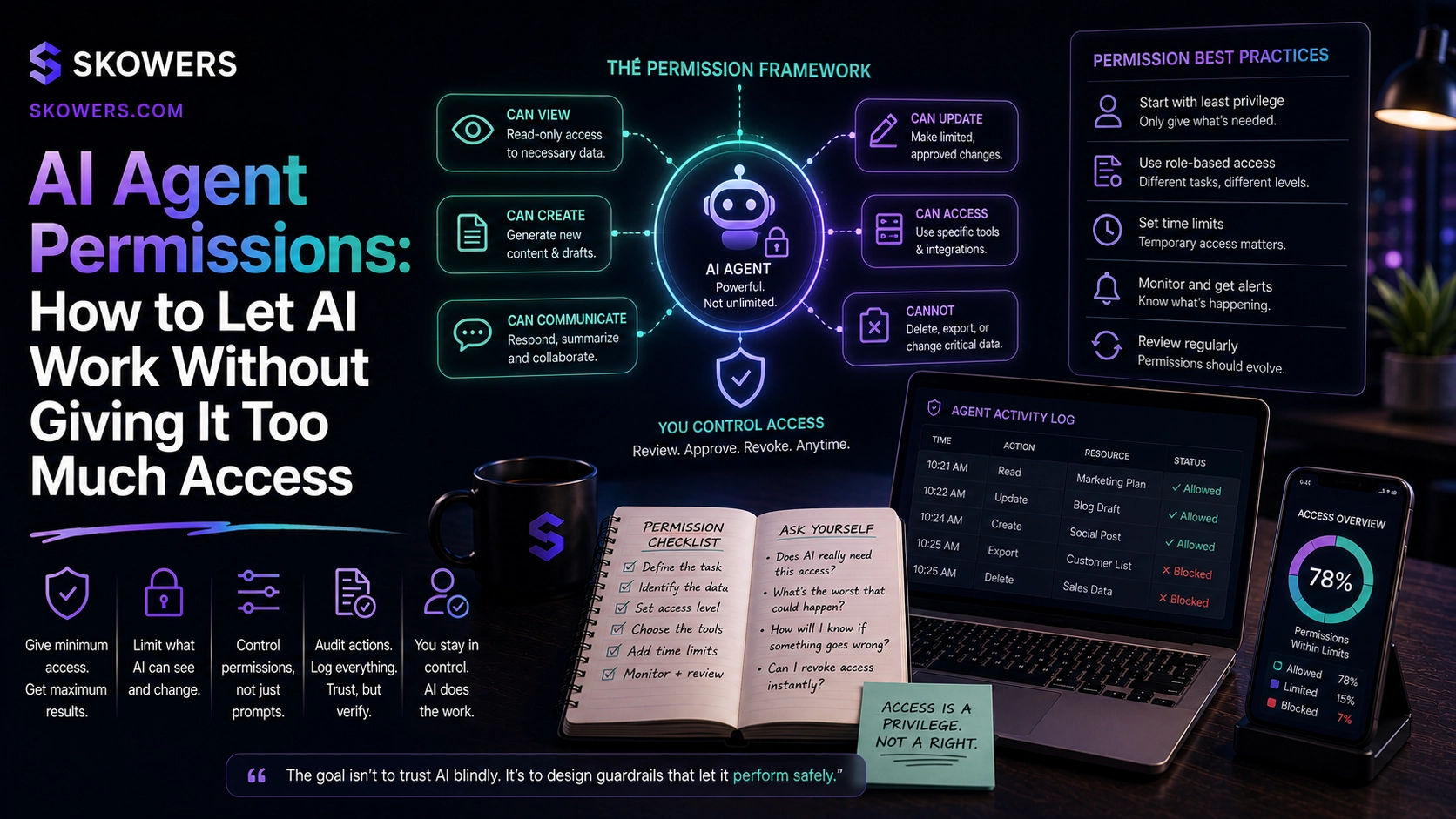
AI Agent Permissions: How to Let AI Work Without Giving It Too Much Access
Listen: AI Agent Permissions: How to Let AI Work Without Giving It Too Much Access
AI agents are starting to move from chat into action.
That changes the risk.
When an AI tool only drafts an email, the mistake is usually visible before anything happens. When an AI agent can update a CRM, send a message, create a task, edit a document, move a file, trigger an automation, or touch a customer record, the decision becomes more serious.
The question is no longer only which AI tool is best.
The better question is what should this AI be allowed to do?
That is why AI permissions are becoming one of the most important stack skills for small businesses, sales teams, marketers, operators, and founders. Useful agents need access. Safe agents need limits.
A business that gives every AI tool full access to every account is not becoming modern. It is creating a new kind of operational risk.
A business that blocks every action is not getting much leverage either.
The practical answer sits in the middle. Give AI enough access to help, but not enough access to surprise you.
Why Permissions Matter More Now
Early AI use was mostly personal.
People asked for ideas, summaries, outlines, drafts, and research help. That was valuable, but it usually stayed inside one conversation.
Now AI is being connected to calendars, inboxes, CRMs, support desks, files, spreadsheets, payment tools, project systems, website builders, call notes, and automation platforms.
That makes AI more useful.
It also means one bad instruction, weak prompt, wrong tool connection, or misunderstood workflow can create real cleanup.
An agent with broad access might email the wrong prospect, overwrite a field, expose sensitive context, create duplicate tasks, move a file, or take action before a manager has reviewed the output.
Most of these problems are not science fiction. They are normal software permission problems showing up inside AI workflows.
The fix is not fear.
The fix is permission design.
The New Rule: Least Privilege For AI
Least privilege means a system gets only the access it needs to complete the job.
That idea already exists in security, but it now matters for everyday AI operations.
If an AI agent only needs to summarize call notes, it should not have permission to send emails.
If it only needs to draft a support reply, it should not be able to issue refunds.
If it only needs to enrich a lead record, it should not be able to delete contacts.
If it only needs to prepare a proposal, it should not be able to change pricing rules.
This is not about slowing everything down. It is about keeping AI useful without making it reckless.
What A Safe AI Permission Layer Includes
A strong permission layer answers five practical questions.
- What can the AI see?
- What can the AI draft?
- What can the AI change?
- What requires approval?
- What gets logged for review?
Those five questions turn a vague AI setup into an operating system.
For example, a sales assistant might be allowed to read call notes, research companies, draft follow-up emails, and update a next-step field. It might not be allowed to send the email, change deal value, mark a deal closed, or promise a discount without approval.
A support assistant might be allowed to classify tickets, suggest replies, find policy references, and route urgent issues. It might not be allowed to cancel accounts, offer refunds, or respond to legal complaints without a human.
A marketing assistant might be allowed to draft content, resize creative, summarize campaign data, and prepare social posts. It might not be allowed to publish, change budgets, or approve claims without review.
That is how teams get leverage without losing control.
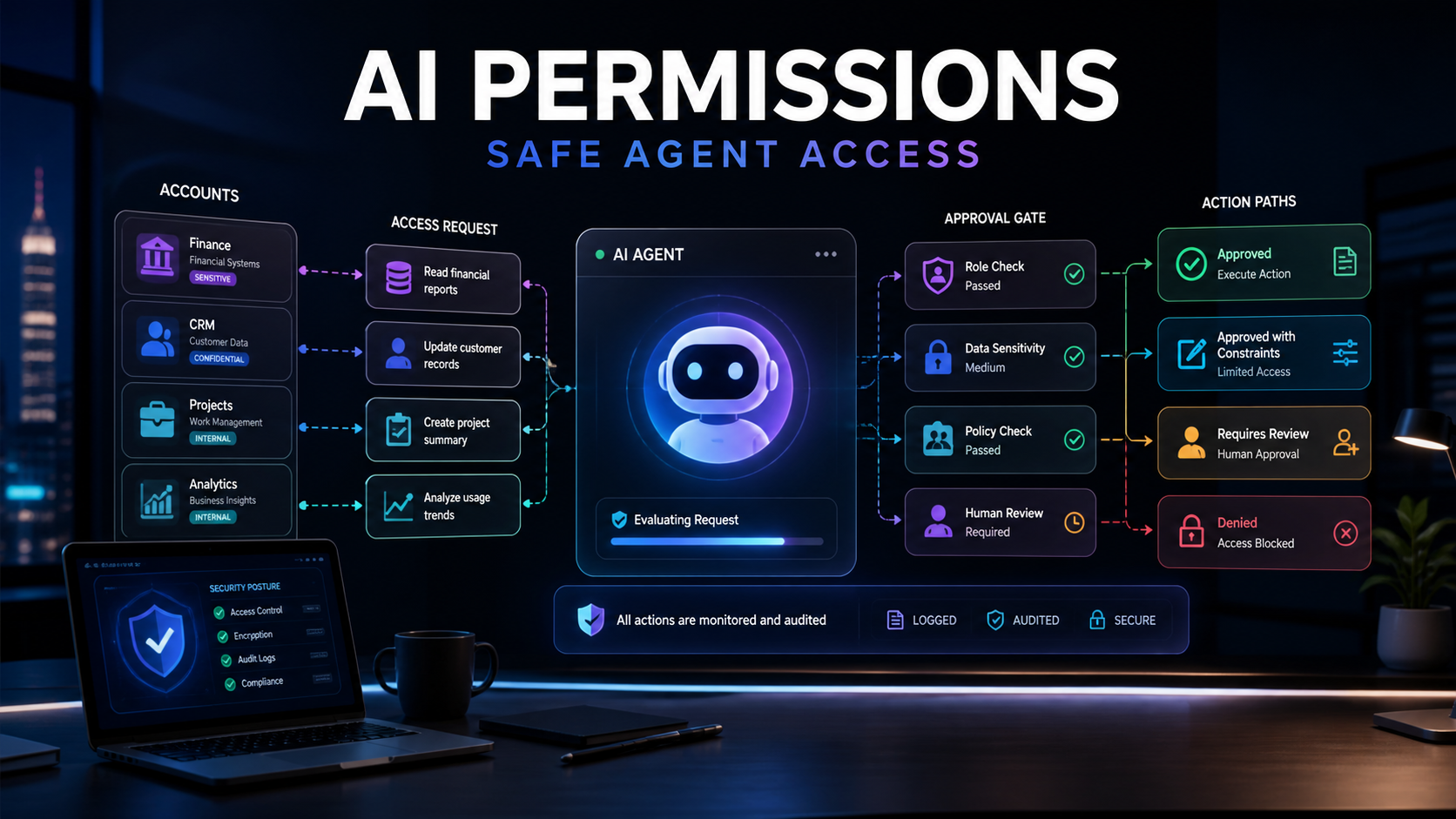
The Four Access Levels Every Business Should Use
Most AI workflows can be sorted into four permission levels.
Read Only
The AI can look at information but cannot change anything.
Use this for research, summarization, analysis, meeting prep, call notes, document lookup, and reporting.
Read-only access is the safest starting point for most tools.
Draft Only
The AI can prepare work, but a human must send, publish, approve, or apply it.
Use this for emails, proposals, support replies, blog outlines, social posts, sales notes, and workflow recommendations.
Draft-only access is usually the best first step when the output touches customers.
Limited Action
The AI can take low-risk actions inside a defined scope.
Use this for creating internal tasks, updating non-sensitive fields, tagging records, moving approved files, or sending internal reminders.
Limited action should always have clear rules, time windows, and logs.
Approval Required
The AI can recommend the action, but a person must approve it before it happens.
Use this for money, legal language, pricing, refunds, account changes, outbound messages, customer escalations, public publishing, and sensitive data.
This is where human judgment protects trust.
Where Teams Get Into Trouble
AI permission problems usually start with convenience.
Someone connects a tool because it saves time. The app asks for broad access. The team accepts because the setup screen is in the way of getting work done.
That might be fine for a low-risk note-taking app.
It is not fine for a workflow that touches customers, revenue, employee data, financial data, health data, contracts, or public publishing.
Common mistakes include:
- Connecting personal accounts instead of shared business accounts
- Giving write access when read access would work
- Letting AI send messages before draft quality is proven
- Skipping logs because the tool feels simple
- Treating all customer records as equally safe
- Letting one automation trigger another without a review point
- Forgetting who owns the outcome when the AI acts
The hidden problem is accountability.
If nobody owns the workflow, nobody reviews the permissions.
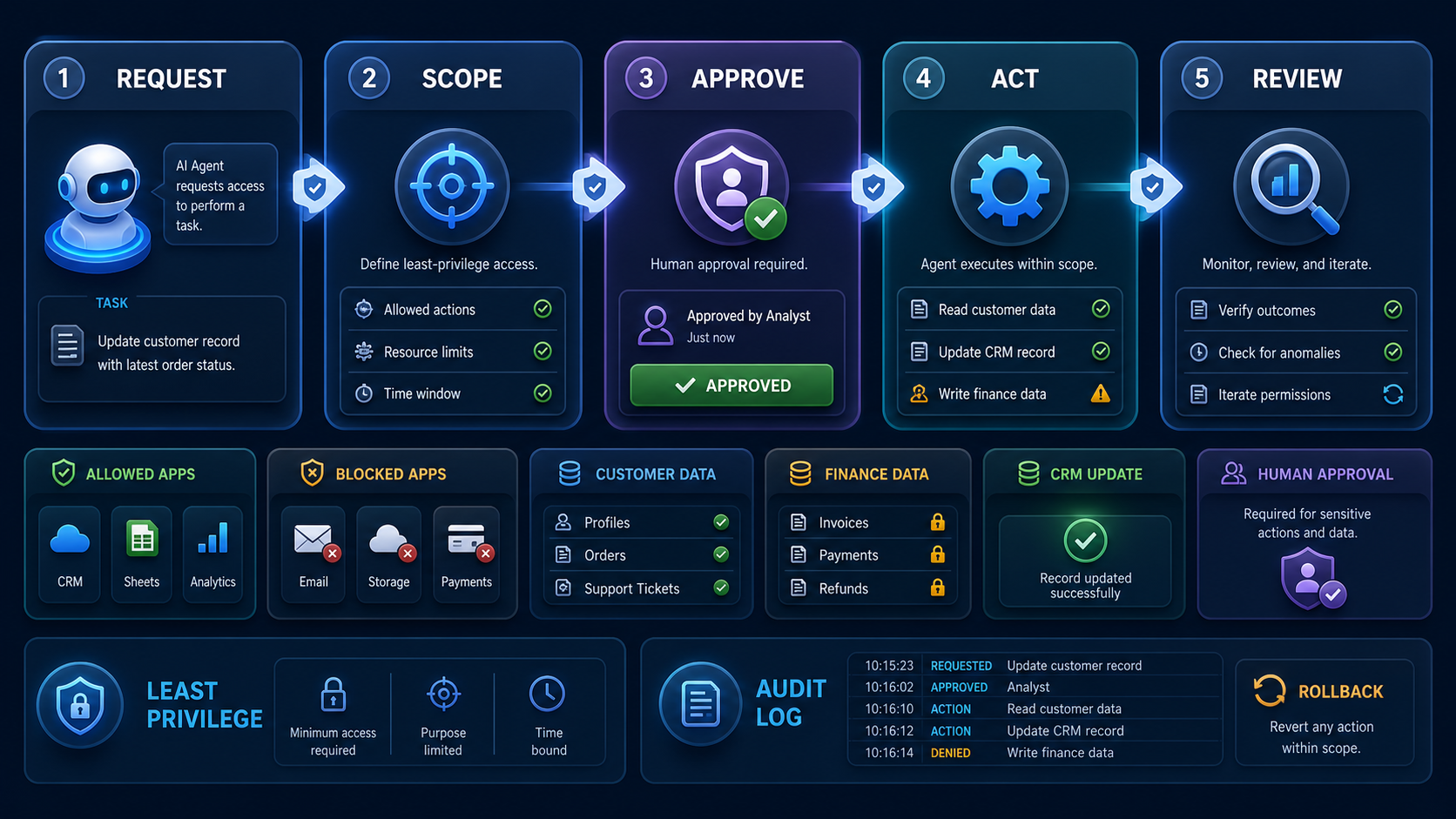
A Practical Permission Checklist
Before connecting an AI agent to a business tool, answer these questions.
- What job is the agent doing?
- Which systems does it need to read?
- Which systems does it need to write to?
- What data should it never access?
- What action would create customer risk?
- What action would create financial risk?
- What action would create legal or brand risk?
- Who approves sensitive actions?
- Where will the log live?
- How can the team roll back a mistake?
If the answers are not clear, the agent is not ready for broad access.
Start narrower.
Then expand once the workflow proves itself.
How To Start Without Overbuilding
You do not need a complicated security program to make this useful.
Start with one workflow.
Pick something real, frequent, and annoying.
Good examples include:
- Drafting sales follow-ups from call notes
- Routing support tickets by urgency
- Creating tasks from meeting summaries
- Updating CRM notes after a call
- Preparing weekly performance summaries
- Turning form submissions into internal briefs
Give the AI read-only or draft-only access first.
Watch the output for one or two weeks.
If the work is accurate, expand to limited actions. If the work is inconsistent, improve the instructions, data, or review process before giving it more power.
This is how AI adoption becomes safer and more useful at the same time.
What To Track
Permissions should not be set once and forgotten.
Track the workflow like a small operating system.
- How many tasks did the agent handle?
- How many drafts were accepted?
- How many required edits?
- How many actions were blocked?
- How many errors happened?
- Which permissions were unused?
- Which approvals slowed the work for a good reason?
- Which approvals created unnecessary friction?
Unused permissions should be removed.
High-risk actions should stay gated.
Reliable low-risk work can earn more autonomy over time.
The Best AI Stack Is Not The Most Connected Stack
The strongest AI stack is not the one with the most integrations.
It is the one where each tool has a clear job, a clear boundary, and a clear owner.
That matters for tool selection too.
When comparing AI apps, do not only ask whether they connect to your CRM, inbox, files, or calendar. Ask how permissions work. Ask whether you can control read and write access separately. Ask whether actions are logged. Ask whether approvals exist. Ask whether you can test in a sandbox before using real customer data.
Those details may seem boring.
They are what make AI useful after the demo.
The Bottom Line
AI agents become valuable when they can help with real work.
Real work requires access.
Access requires judgment.
The next business skill is not giving AI everything and hoping it behaves. It is designing the permission layer so AI can move faster inside safe boundaries.
Let AI read before it writes.
Let it draft before it sends.
Let it recommend before it commits.
Let it earn more access only when the workflow proves it can handle the responsibility.
That is how businesses can use AI agents without turning every tool into an unmanaged risk.
Related Articles
Continue Your Research