
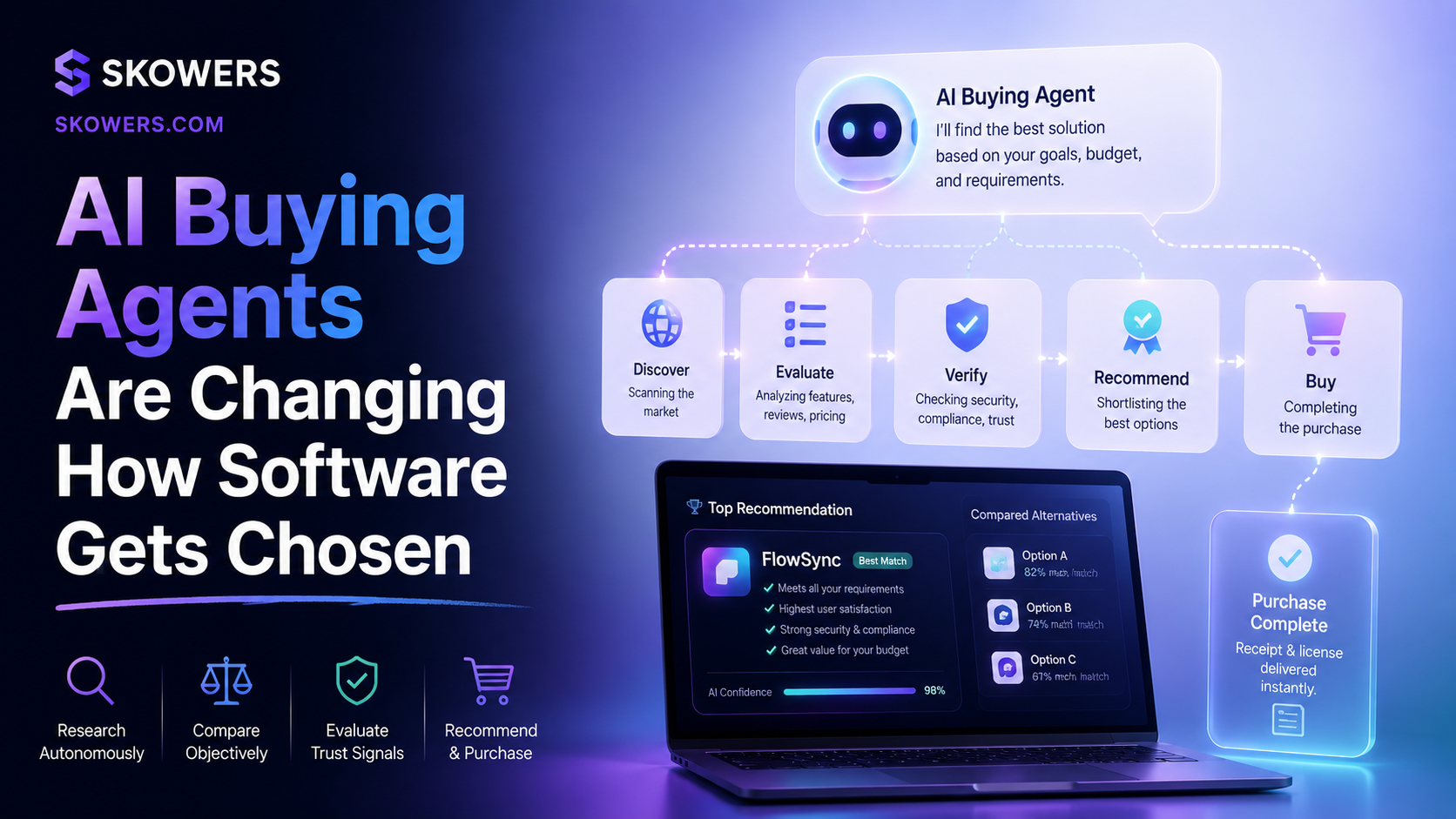
AI Buying Agents Are Changing How Software Gets Chosen
Listen: AI Buying Agents Are Changing How Software Gets Chosen
Software buying used to start with a search box.
Someone typed best CRM for small business, opened five tabs, skimmed review sites, watched a demo video, and hoped the comparison was honest.
That habit is changing.
More buyers are starting with an AI assistant. They ask what tool fits their budget, team size, use case, integrations, and pain point. The assistant compares options, explains tradeoffs, and helps the buyer move toward a shortlist before the vendor ever sees the visit.
This is not only a retail story.
It matters for AI apps, CRM tools, marketing platforms, automation software, sales systems, support chatbots, creative tools, and every product that depends on people comparing options before signing up.
If a software page cannot explain who the tool is for, what problem it solves, what it costs, what it replaces, and when it is not the right fit, an AI buying agent may skip over it.
That is the new discovery problem.
What An AI Buying Agent Does
An AI buying agent is a helper that turns messy research into a cleaner decision.
It may live inside ChatGPT, Google Search, a browser, a shopping tool, a procurement platform, or a company workflow. The exact product matters less than the behavior.
The buyer asks a practical question.
The agent looks for options.
It compares the options against the buyer's constraints.
It explains the likely tradeoffs.
It may send the buyer to a page, a demo, a checkout, or a free trial.
OpenAI has been building richer product discovery in ChatGPT. Google has also pushed AI Mode, agentic commerce, conversational discovery ads, and retailer tools that help shoppers ask more specific questions instead of filtering through pages of results.
The direction is clear.
Discovery is becoming conversational.
That means software pages need to work harder than old SEO pages.
Why This Changes Buyer Intent
Classic search shows the buyer many options.
AI discovery tries to reduce the options.
That is a huge difference.
In classic search, a user might click ten pages before deciding. In AI discovery, the assistant may recommend three tools before the user sees a traditional results page.
This creates a new kind of buyer intent.
The visitor who arrives from an AI answer may already know the category. They may already have a reason to compare. They may already be closer to action.
They are not looking for a vague intro.
They want confidence.
They want to know whether this tool fits their workflow right now.
That is why review pages, tool pages, and setup guides need to become sharper.
What Buyers Ask AI Assistants
People rarely ask buying agents for a generic list.
They ask specific questions.
- What is the best chatbot for a small ecommerce store?
- What CRM is good if I need calling and follow-up automation?
- What AI tool helps me localize a website without rebuilding every page?
- What is the easiest way to turn long videos into social posts?
- Which sales tool is better if I need contact data and outreach?
- What free trial should I test before paying for a full platform?
- What tool works for a founder without a big team?
These questions are full of context.
That context is where good directory pages can win.
A thin page that says a tool is powerful, innovative, and easy to use does not answer the buyer.
A strong page explains the use case, the best fit, the tradeoffs, the setup path, and the next action.
The New Software Page Standard
A good page for AI-assisted buyers should answer the questions that actually shape a decision.
Buyer Fit
Say the real buyer.
Is it for founders, agencies, sales teams, ecommerce stores, recruiters, creators, support teams, local businesses, or enterprise operators?
Do not make every tool sound like it is for everyone.
AI assistants need clear fit signals, and human buyers do too.
Workflow Value
Buyers think in jobs.
They want more meetings, faster content, cleaner support, better lead data, fewer manual updates, stronger SEO visibility, easier localization, or a smoother customer journey.
Name the job.
Then explain what gets easier.
First Trial Workflow
A free trial button is better when the page tells the user what to test.
Do not only say start free trial.
Say what to do after opening the trial.
Example language can be simple.
Open the trial, connect one real workflow, and judge the tool on time saved before you upgrade.
That turns the click into a plan.
Integration Fit
Integrations matter because buyers already have tools.
If a product fits with CRM, email, support, ads, content, analytics, WordPress, Shopify, Zapier, Make, n8n, Slack, or Google Workspace, the page should say so clearly.
AI assistants compare fit.
Integration details help them choose.
Limits And Tradeoffs
This sounds risky, but it builds trust.
If a tool is better for small teams than enterprises, say it.
If it needs clean data, say it.
If it is best after a company already has traffic, say it.
If it is strong for drafts but needs human approval for publishing, say it.
Buying agents reward clarity because clarity reduces bad recommendations.
Comparison Context
People compare naturally.
A useful page can mention nearby categories without turning into a fake battle.
For example, a support chatbot can be compared with live chat, help desk automation, and customer success tools.
A sales enrichment tool can be compared with CRM cleanup, lead databases, and outbound sequencers.
A localization tool can be compared with manual translation, duplicated websites, and international SEO workflows.
This gives the buyer a mental map.
Clear Next Step
Every page should lead to one clear action.
Start a free trial.
Watch the setup video.
Read the full guide.
Compare related tools.
Add it to the dashboard.
The page should not end in a dead stop.
What This Means For Buyers
This shift is useful for readers because it can make software research less random.
Instead of opening a dozen tabs and guessing which claims matter, a buyer can use an AI assistant to narrow the field around a real workflow.
That does not mean the assistant should make the final decision.
It means the assistant can help ask better questions.
For a sales tool, ask how it finds prospects, writes outreach, logs activity, and handles follow-up.
For a support tool, ask how it answers buying questions, qualifies urgency, and routes serious cases.
For a content tool, ask how it turns one idea into assets that can be published across formats.
For an automation tool, ask what should be automated first and what should stay human.
The best result is not the longest list of tools.
The best result is a short list that matches the job you actually need done.
What A Helpful Tool Page Should Show
When you land on a software page, look for buying context.
A helpful page should make the decision easier, not just repeat marketing copy.
Useful signals include:
- A plain-English fit summary
- The best first workflow to test
- Use cases by buyer type
- Setup steps
- A short review section
- A video when one is available
- Related tools for comparison
- A clear free trial or next step
- Links to a fuller guide when the setup is more involved
These details are not filler.
They help you judge whether the tool belongs in your stack.
They also help AI assistants understand when a tool is a real match instead of a generic recommendation.
The Buyer Journey Is Getting Shorter
The old journey looked like this.
Search, skim, compare, forget, return later, ask a friend, watch a video, open a trial.
The new journey can look like this.
Ask an AI assistant, receive a shortlist, open one detailed page, watch one video, start one trial.
That shorter journey is good for buyers who know what they need.
It is risky for buyers who accept the first answer without checking the details.
Confidence still comes from specifics.
The page should show enough context for you to understand why the tool fits.
A Practical Page Checklist
Use this checklist before starting a trial or booking a demo.
- Does the page name who the tool is best for?
- Does it explain the job the tool helps with?
- Does it give you a realistic first workflow to test?
- Does it answer common buyer objections?
- Does it explain when the tool is not ideal?
- Does it show a video if setup is easier to understand visually?
- Does it link to a fuller guide when the product is more complex?
- Does it compare related categories or alternatives?
- Does the next step feel clear?
- Does the page feel helpful before asking for the click?
If the answer is no, slow down before handing over your email, budget, or customer data.
The best buying decisions come from a clear fit, not from a shiny button.
The Bottom Line
AI buying agents are turning software discovery into a guided decision.
That raises the standard for tool pages.
The winners will not be the tools with the most generic praise. They will be the tools that make their fit, workflow, tradeoffs, and next step easy to understand.
For buyers, this means a better way to compare software.
For teams choosing AI apps, it means less time chasing broad promises and more time testing the workflow that matters.
The buyer is no longer only browsing.
The buyer is asking an assistant to help choose.
The smart move is to use that assistant for research, then use detailed pages, setup guides, videos, and trials to confirm the fit yourself.

Related Articles
Continue Your Research