
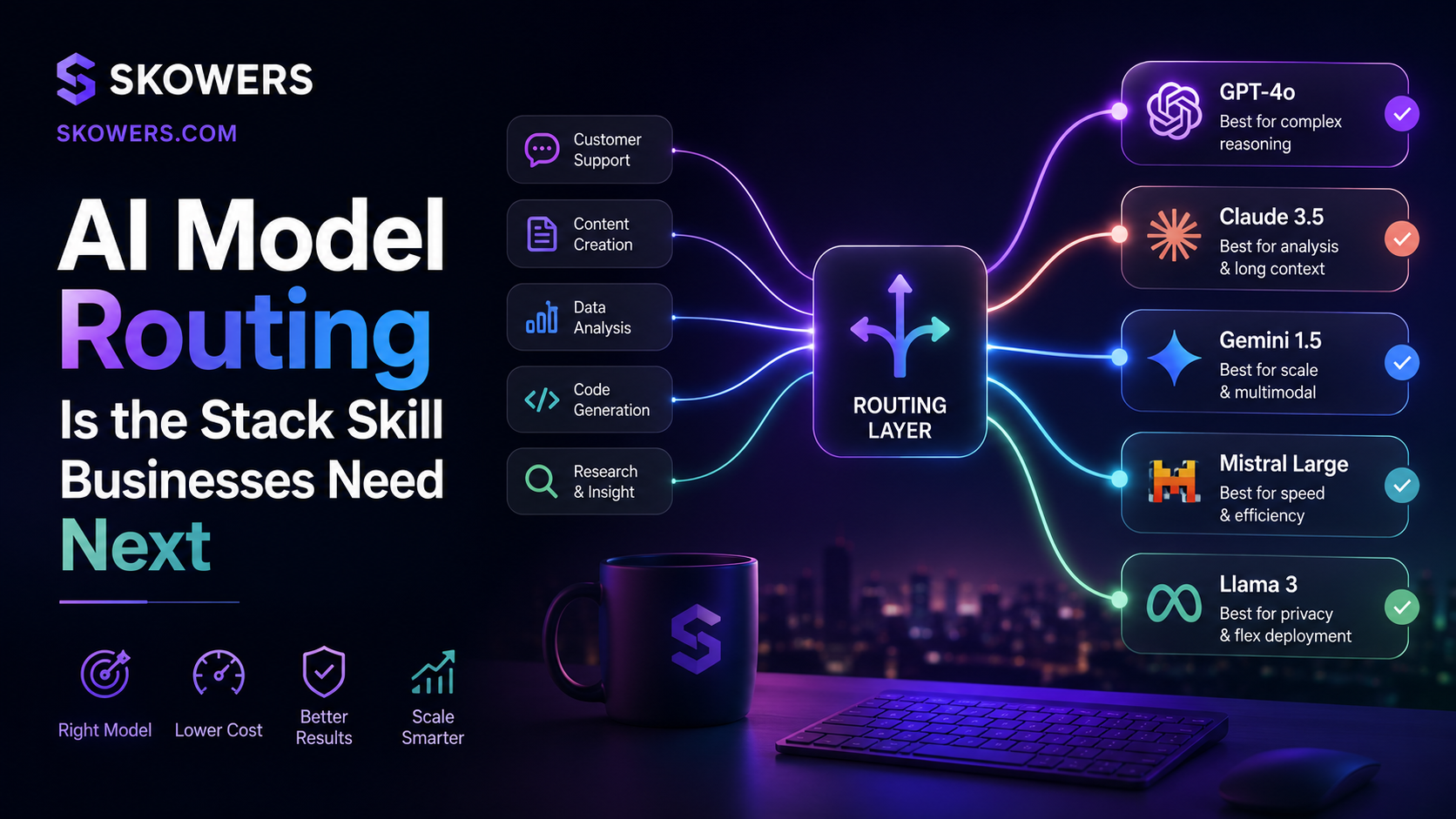
AI Model Routing Is the Stack Skill Businesses Need Next
Listen: AI Model Routing Is the Stack Skill Businesses Need Next
For the last two years, most AI conversations started with one question.
Which model is best?
That question is becoming less useful.
The better question for 2026 is which model should do this specific job?
Businesses are starting to learn that one AI system should not handle every task. A premium reasoning model may be worth it for legal review, product strategy, customer escalation, complex coding, or high-value sales research. It may be wasteful for tagging leads, summarizing form fills, rewriting product descriptions, sorting support messages, or drafting first-pass social copy.
That is where model routing comes in.
Model routing is the practice of sending each task to the right AI model, workflow, or tool based on cost, speed, risk, and quality needs. It is not only a developer topic. It is becoming a practical operating skill for founders, marketers, sales teams, support leaders, and anyone building an AI stack that needs to work every day.
Why This Matters Now
AI adoption is no longer stuck in a small test group.
McKinsey's latest State of AI survey found that regular AI use has expanded across organizations, while many companies are still trying to move from pilots to scaled value. Google Cloud's 2026 AI agent research points in the same direction. Teams are moving from simple prompts toward connected agent workflows that can carry work across systems.
That shift creates a new problem.
When AI is only used for occasional chat, the bill is easy to ignore. When AI starts touching sales research, content operations, support routing, onboarding, finance, code review, and internal reporting, usage becomes harder to predict.
The cost is not only the subscription.
The cost includes model usage, integrations, prompts, retries, human review, compliance work, vendor overlap, and the time spent fixing low-quality outputs.
This is why model routing matters. It gives teams a way to keep AI useful without letting every workflow default to the most expensive option.
What Model Routing Looks Like
Model routing can be simple.
A support team might use a fast low-cost model to classify incoming messages, a stronger model to draft replies for complex issues, and a human reviewer for refunds, cancellations, legal concerns, or angry customers.
A sales team might use one tool to enrich accounts, another model to summarize company signals, and a premium reasoning model only when building a custom enterprise pitch.
A content team might use a lightweight model for outlines, a stronger model for research synthesis, and a human editor for final claims, examples, and tone.
A developer might use one coding model for quick fixes, another for architecture review, and a local or lower-cost model for repetitive refactors.
The goal is not to make the stack complicated.
The goal is to stop treating every task like it deserves the same AI budget.
The Four Routing Questions
A practical model routing decision starts with four questions.
One
How risky is the task?
Low-risk tasks can usually use faster and cheaper systems. These include tagging, formatting, summarizing public pages, rewriting basic copy, clustering feedback, and organizing internal notes.
Higher-risk tasks need stronger models and clearer review. These include legal language, medical claims, pricing recommendations, financial advice, hiring decisions, security work, and anything that could mislead a customer.
Risk should decide how much human approval is needed.
Two
How much reasoning does the task need?
Some tasks look hard but are actually pattern work.
Example tasks include sorting inbound leads, extracting fields from a transcript, creating a first draft from a detailed brief, or matching a support message to a help article.
Other tasks require real judgment. These include comparing vendors, finding tradeoffs, planning a launch, debugging a complex workflow, or deciding what a customer complaint actually means.
Use stronger models where judgment matters.
Use cheaper models where the task is structured and repeatable.
Three
How visible is the output?
Internal notes can tolerate more rough edges than customer-facing pages.
A quick meeting summary, dashboard note, or private research brief does not need the same level of polish as a landing page, sales email, contract paragraph, product review, or support answer.
The closer the output gets to a customer, the more you should care about quality, review, and auditability.
Four
How often will this run?
A model choice that seems cheap once can become expensive when it runs thousands of times.
This is where teams get surprised.
One premium output per week may be worth it. One premium call on every website chat, every lead enrichment, every ticket update, and every internal search can quietly turn into a real operating expense.
High-volume tasks deserve routing rules first.
A Simple Model Routing Map
You can start with three lanes.
Draft Lane
Use this for low-risk, high-volume, first-pass work.
Good fits include summaries, tags, outlines, formatting, simple rewrites, data cleanup, and short internal drafts.
This lane should be fast and affordable. It should not require the smartest model in your stack.
Judgment Lane
Use this for tasks where the AI has to compare, reason, prioritize, or explain tradeoffs.
Good fits include vendor comparisons, workflow design, account research, product positioning, launch planning, and strategic recommendations.
This lane can justify a stronger model because the output is more valuable.
Approval Lane
Use this for anything that affects money, trust, safety, legal exposure, or customer promises.
Good fits include refunds, contract language, regulated claims, public review content, hiring notes, pricing changes, and support escalations.
This lane should include human review, logging, and a clear record of who approved the action.
Where Teams Waste Money
The biggest waste usually comes from using a premium model for work that does not need premium reasoning.
Common examples include:
- Rewriting short product blurbs
- Classifying support tickets
- Summarizing simple calls
- Turning form answers into CRM notes
- Creating first drafts from clear templates
- Extracting names, dates, companies, and links
- Running every chatbot message through the same expensive workflow
None of these tasks are bad uses of AI.
They are bad uses of the wrong AI.
Where Teams Should Spend More
There are also places where cheap AI is the wrong move.
Spend more when the answer is important, ambiguous, public, or hard to check.
Examples include:
- Enterprise sales research
- High-value customer escalation
- Product strategy
- Security review
- Complex code changes
- Compliance-sensitive copy
- Board or investor reporting
- Tool selection for a serious business process
In these moments, saving a few cents on a model call can create a more expensive problem later.
The best AI stack is not always the cheapest stack.
It is the stack that spends more only where the extra quality changes the result.
What To Ask Vendors
Model routing should also change how you evaluate AI tools.
When you are comparing software, ask better buying questions.
- Can we choose which model powers each workflow?
- Can we set approval rules for sensitive tasks?
- Can we see usage by team, workflow, and task type?
- Can we cap spend or get alerts before usage jumps?
- Can we route low-risk work to a lower-cost model?
- Can we keep premium models for high-value tasks?
- Can we review outputs before they reach customers?
- Can we export logs when we need to audit a decision?
These questions are practical.
They tell you whether a tool is built for real operations or just impressive demos.
A Starter Plan For Small Teams
You do not need an enterprise AI platform to start routing work intelligently.
Start with a simple audit.
List every place AI is used in your business. Include chat tools, browser agents, sales tools, support bots, content generators, coding assistants, automations, and any AI feature inside software you already pay for.
Then mark each use case with three labels.
Risk level.
Volume.
Customer visibility.
That simple map will show you where routing matters first.
High-volume and low-risk tasks should be optimized for cost and speed.
Low-volume and high-risk tasks should be optimized for quality and review.
Customer-facing tasks should be optimized for accuracy, tone, and approval.
After that, choose one workflow to improve.
Do not rebuild the whole company at once.
Pick the workflow where AI is used often, quality matters, and the process is messy enough that better routing would help.
The Bottom Line
AI is becoming part of normal business operations.
That means the old habit of choosing one favorite model for everything will start to break.
The next advantage is knowing how to assign the right AI to the right job.
Use cheaper systems for repeatable work. Use stronger systems for judgment. Use human approval for decisions that affect trust, money, safety, or customers.
That is model routing in plain language.
It helps teams stay fast, control spend, and build AI workflows that can actually survive outside a demo.

Related Articles
Continue Your Research