
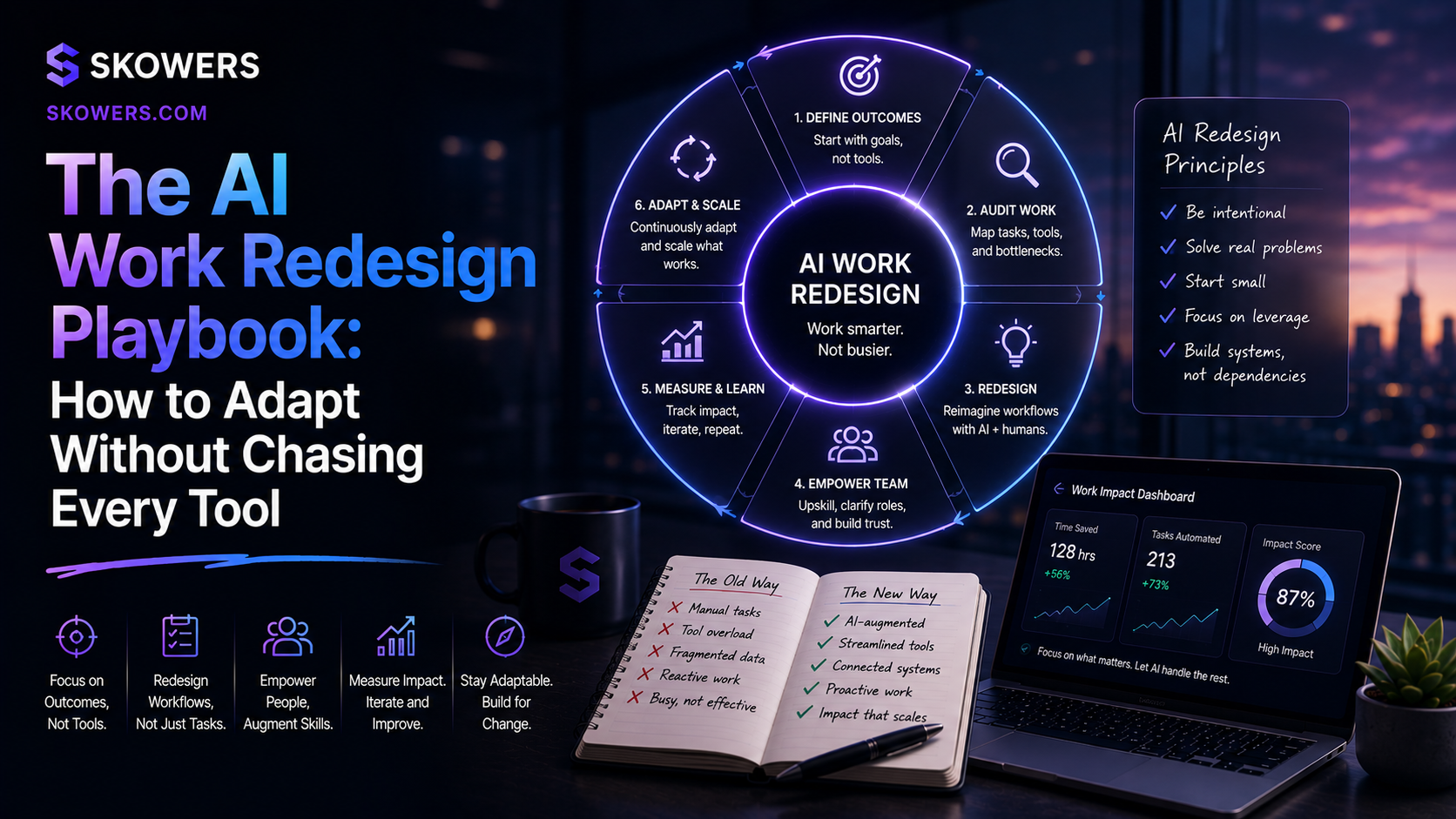
The AI Work Redesign Playbook: How to Adapt Without Chasing Every Tool
Listen: The AI Work Redesign Playbook: How to Adapt Without Chasing Every Tool
The easiest mistake in AI right now is buying one more tool and calling it progress.
That feels productive for a week.
Then the old workflow returns.
The inbox is still messy. Meetings still create vague follow-ups. Sales notes still disappear. Support answers still need review. Content still gets published late. Nobody knows which AI output can be trusted, which one needs approval, and which task should never have been automated in the first place.
The next advantage is not only prompt writing.
It is work redesign.
That means looking at the actual job, finding the slow or repetitive parts, deciding where AI should help, and building a simple system around the result.
This matters because AI is moving from a side tab into the work itself. Microsoft has described a shift toward agentic work and frontier firms. The World Economic Forum's Future of Jobs research continues to point toward technology literacy, analytical thinking, and reskilling as core workplace needs. McKinsey's AI research keeps showing that value comes from changing workflows, not only experimenting with models.
The practical lesson is clear.
People who adapt fastest will not be the people with the longest tool list.
They will be the people who know how to redesign a job around better inputs, AI assistance, human judgment, and measurable outcomes.
What Work Redesign Means
Work redesign is the process of rebuilding a task so AI improves the result instead of adding another step.
It asks better questions than "what AI tool should I use?"
It asks:
- What outcome does this task need to produce?
- What part is repetitive?
- What part needs judgment?
- What information does the AI need?
- Where should a human approve the output?
- How will we know if this is better?
That shift matters.
If you automate a bad workflow, you get a faster bad workflow.
If you redesign the workflow first, AI has a real job to do.
The Old Way of Adapting to Software
Most teams learned software by adding apps.
Need better notes? Add a meeting recorder.
Need more leads? Add a prospecting tool.
Need faster content? Add an AI writer.
Need automation? Add a workflow builder.
That approach can work, but it breaks when every tool has AI inside it.
If every app can summarize, draft, recommend, and automate, the problem is no longer access to AI.
The problem is coordination.
Who owns the task?
Which output is trusted?
What data is allowed?
Where does the work go next?
What happens when the AI is wrong?
Those questions are now part of normal operations.
The New Skill Is Workflow Judgment
Workflow judgment is the ability to look at a task and decide how AI should participate.
It is not technical in the narrow sense.
It is practical.
For example, a sales follow-up workflow might look simple from the outside.
A rep finishes a call. The AI writes a recap. The CRM gets updated. A follow-up email goes out.
But the real workflow has judgment inside it.
Did the AI capture the buyer's real objection?
Did it separate a casual comment from a buying signal?
Did it promise anything the company cannot deliver?
Should the email be sent automatically or reviewed first?
Should the CRM note be visible to the whole team?
The person who can answer those questions is more valuable than the person who only knows where the AI button is.
Start With the Work, Not the Tool
A clean AI adoption process starts with one recurring job.
Pick work that happens often enough to matter and is structured enough to improve.
Good candidates include:
- Weekly reporting
- Sales call follow-up
- Support triage
- Product research
- Proposal drafting
- Content repurposing
- Meeting preparation
- Customer onboarding
- Vendor comparison
- Internal knowledge search
Avoid starting with the most sensitive or chaotic workflow.
The best first project is usually annoying, repeatable, and easy to inspect.
If the output is wrong, someone can catch it.
If the output is right, the team saves time every week.
Map the Current Workflow
Before adding AI, write down how the work happens now.
Keep it simple.
For each workflow, capture:
- The trigger
- The input
- The person responsible
- The tools used
- The decision points
- The output
- The handoff
- The review step
- The success metric
This map usually reveals the real bottleneck.
Maybe the problem is not writing the report.
Maybe the problem is that data lives in five places.
Maybe the problem is not drafting content.
Maybe the problem is that nobody approved the angle.
Maybe the problem is not customer support volume.
Maybe the problem is that the help docs are outdated.
AI can help with many of these problems, but only after the team names the real one.
Use Four Lanes for AI Work
Most tasks fit into four practical lanes.
Lane One: AI as Research Assistant
Use AI to gather, summarize, compare, and organize information.
This is usually a low-risk place to start.
Examples:
- Compare three software tools before starting a trial
- Summarize product reviews
- Pull themes from customer feedback
- Prepare a meeting brief
- Build a first-pass competitor table
The human job is to check sources, judge relevance, and decide what matters.
Lane Two: AI as Drafting Partner
Use AI to create a first draft from clear inputs.
Examples:
- Follow-up emails
- Proposal sections
- Help center drafts
- Social posts
- Internal updates
- Product descriptions
The human job is to review tone, facts, claims, and fit.
Drafting is powerful because it removes blank-page friction.
It is risky when people publish without reading.
Lane Three: AI as Workflow Operator
Use AI to move work between systems after rules are clear.
Examples:
- Create CRM notes from calls
- Route support tickets
- Add tasks from meeting action items
- Update a dashboard
- Trigger reminders
- Prepare weekly reports
Tools like n8n, Lindy, and other agentic workflow platforms become useful here because the task has a pattern.
The human job is to set boundaries, monitor failures, and improve the rules.
Lane Four: AI as Decision Support
Use AI to help compare options, but keep humans in charge of the decision.
Examples:
- Which tool should we trial?
- Which lead list looks strongest?
- Which customer issue should be escalated?
- Which campaign should get more budget?
- Which workflow should be automated next?
Decision support is where AI can save time, but it should not hide uncertainty.
Good systems explain what they used, what they ignored, and where confidence is low.
What Not To Automate First
Some tasks look tempting because they are time-consuming.
That does not mean they should be automated first.
Be careful with work that:
- Moves money
- Sends public messages
- Changes customer records
- Deletes data
- Makes legal claims
- Handles sensitive health or financial information
- Approves hiring or firing decisions
- Commits the company to a price or promise
These tasks can still benefit from AI, but they need stronger review.
Start with draft, summarize, recommend, and prepare.
Move to automatic action only after the workflow has clear rules, logs, owners, and rollback paths.
The Adaptation Stack
People often ask which tool to learn first.
The better answer is to learn a small stack of habits.

Capture
Get the raw material into a place the team can use.
Calls, notes, files, feedback, tickets, and examples should not disappear into private tabs.
Context
Give the AI enough background to understand the task.
That includes buyer type, goal, constraints, source material, examples, and what not to do.
Draft
Let AI produce a first pass.
Do not expect the first pass to be final.
Review
Check the work against facts, tone, policy, customer impact, and business judgment.
Automate
Only automate the parts that are repeatable and safe enough.
Measure
Track whether the new workflow saves time, improves quality, reduces mistakes, or creates revenue.
This stack is simple, but it is what separates useful AI adoption from tool clutter.
How Workers Can Adapt
If you are an employee, freelancer, or job seeker, the safest path is to become the person who can improve workflows.
You do not need to become an AI engineer.
You need to prove that you can:
- Find repetitive work
- Prepare clean inputs
- Use AI to create a useful first draft
- Review outputs carefully
- Document the process
- Protect sensitive data
- Measure the improvement
That skill travels across roles.
A marketer can use it for campaign briefs.
A salesperson can use it for follow-up and CRM hygiene.
A support rep can use it for answer quality and ticket routing.
A manager can use it for reporting and decision prep.
A founder can use it to run a leaner business without losing control.
How Small Teams Can Adapt
Small teams should avoid trying to transform everything at once.
Pick one workflow per month.
Use this sequence:
- Choose the workflow
- Map the current process
- Define the desired output
- Choose the AI lane
- Create review rules
- Test on real work
- Measure before expanding
The goal is not to look advanced.
The goal is to remove friction from work that already matters.
Questions to Ask Before Buying Another AI Tool
Before adding another subscription, ask:
- What workflow will this improve?
- What existing tool does it replace or strengthen?
- What input does it need?
- Who reviews the output?
- What happens if it is wrong?
- Will it connect to the tools we already use?
- Can we test it in one week?
- What metric proves it earned a place?
If nobody can answer these questions, the tool may still be interesting.
It is just not ready to become part of the operating system.
A Practical One Week Test
Here is a simple test any team can run.
Pick one workflow that happens every week.
Write the current steps on one page.
Choose one AI role: research, draft, operate, or support a decision.
Run five real examples through the new process.
Review the outputs manually.
Track time saved, edits required, mistakes found, and whether the final result was better.
At the end of the week, decide one of three outcomes.
Keep it.
Improve it.
Drop it.
This is how AI adoption becomes grounded.
Not vibes.
Not demos.
Actual work.
The Bottom Line
AI is no longer only a tool category.
It is becoming part of how work is designed.
That changes what adaptation means.
The winners will not be the people who try every new app first. They will be the people who can redesign a task so AI handles the repeatable parts, humans handle judgment, and the final result improves.
Start small.
Map one workflow.
Give AI one clear job.
Keep human review where it matters.
Measure the outcome.
Then repeat.
That is the AI work redesign playbook.

Related Articles
Continue Your Research