
Bitdefender for Small Business: A Practical Guide to Ransomware, Phishing, and Endpoint Security
Cybersecurity rarely fails because a small business never heard of malware. It fails because one laptop was missed, one administrator account was weak, one alert went unread, or one backup had never been tested.
That is why choosing security software is only the beginning. The larger job is turning protection into a routine that covers every device, gives the right people visibility, and helps the business recover when prevention is not enough.
Bitdefender GravityZone is designed to centralize that work. It combines endpoint protection with a web-based management console so a small team can deploy policies, monitor devices, review risk, and respond to threats without configuring every computer separately.
This guide explains what Bitdefender does, where it fits, how to deploy it carefully, and what it cannot replace. If you want to compare the listing before starting, open the Skowers Bitdefender overview. You can also start Bitdefender through our partner link. Skowers may earn a commission if you choose a paid plan, at no additional cost to you.
What Is Bitdefender GravityZone?
Bitdefender GravityZone is a business security platform for managing protection across laptops, desktops, and servers. Its Control Center provides a central place to create policies, see endpoint status, review security events, and manage the software installed on protected devices.
The security agent on each endpoint monitors activity and applies the policy assigned through GravityZone. Depending on the edition and licensed modules, protection can include antimalware, behavioral monitoring, exploit defense, web controls, network attack defense, ransomware mitigation, risk management, firewall controls, and optional services such as patch management or full-disk encryption.
Feature availability varies by plan. That detail matters. Do not assume that a capability mentioned on a general product page is included in every license. Confirm the current edition, operating-system support, server coverage, and add-ons before buying.
What Problem Does Bitdefender Solve?
A small business often has more endpoints than it realizes. There are office desktops, employee laptops, remote devices, servers, shared workstations, and machines that only connect occasionally. Each one can become an entry point for stolen credentials, malicious downloads, ransomware, or lateral movement through the network.
Consumer antivirus can protect an individual computer, but a business also needs central visibility. Someone should be able to answer:
- Which devices are protected right now?
- Which machines have not checked in recently?
- Are employees running outdated or risky software?
- Which threats were blocked, quarantined, or left unresolved?
- Are policies consistent across remote and office devices?
- Who owns the response when an alert appears?
GravityZone helps organize those answers. Its value is not only detecting a malicious file. It is making protection visible and manageable across the business.
How Bitdefender Uses AI and Behavioral Detection
Modern threats do not always arrive as a known virus with a familiar signature. Attackers change files, use legitimate tools in harmful ways, exploit software weaknesses, and attempt to encrypt data before a traditional scanner recognizes a named threat.
Bitdefender describes GravityZone as using machine learning, behavioral analysis, and continuous process monitoring. In practical terms, the software can evaluate what a process is doing, not only whether its file name appears on a known-malware list.
That matters for ransomware. Abnormal encryption behavior can be more revealing than the name of the program performing it. GravityZone can block suspicious activity and, where supported and configured, use ransomware mitigation to restore affected files from protected copies.
No detection system is perfect. AI-powered security does not justify weaker passwords, untested backups, or careless access. It is one layer that can identify patterns faster than a person watching every device manually.
The Small-Business Threat Model
Before deploying any security tool, identify what you are defending and how an attacker is most likely to reach it.
For many small businesses, the highest-probability paths are ordinary:
- A convincing phishing email steals a password.
- A fake invoice or shared document installs malware.
- An exposed remote service is attacked repeatedly.
- An employee reuses a breached password.
- A personal device connects to business files without adequate protection.
- Old software remains vulnerable because updates were delayed.
- A privileged account is used for routine browsing and email.
- Ransomware encrypts both working files and reachable backups.
The best protection plan starts with these realistic paths. It does not begin with rare, cinematic threats.
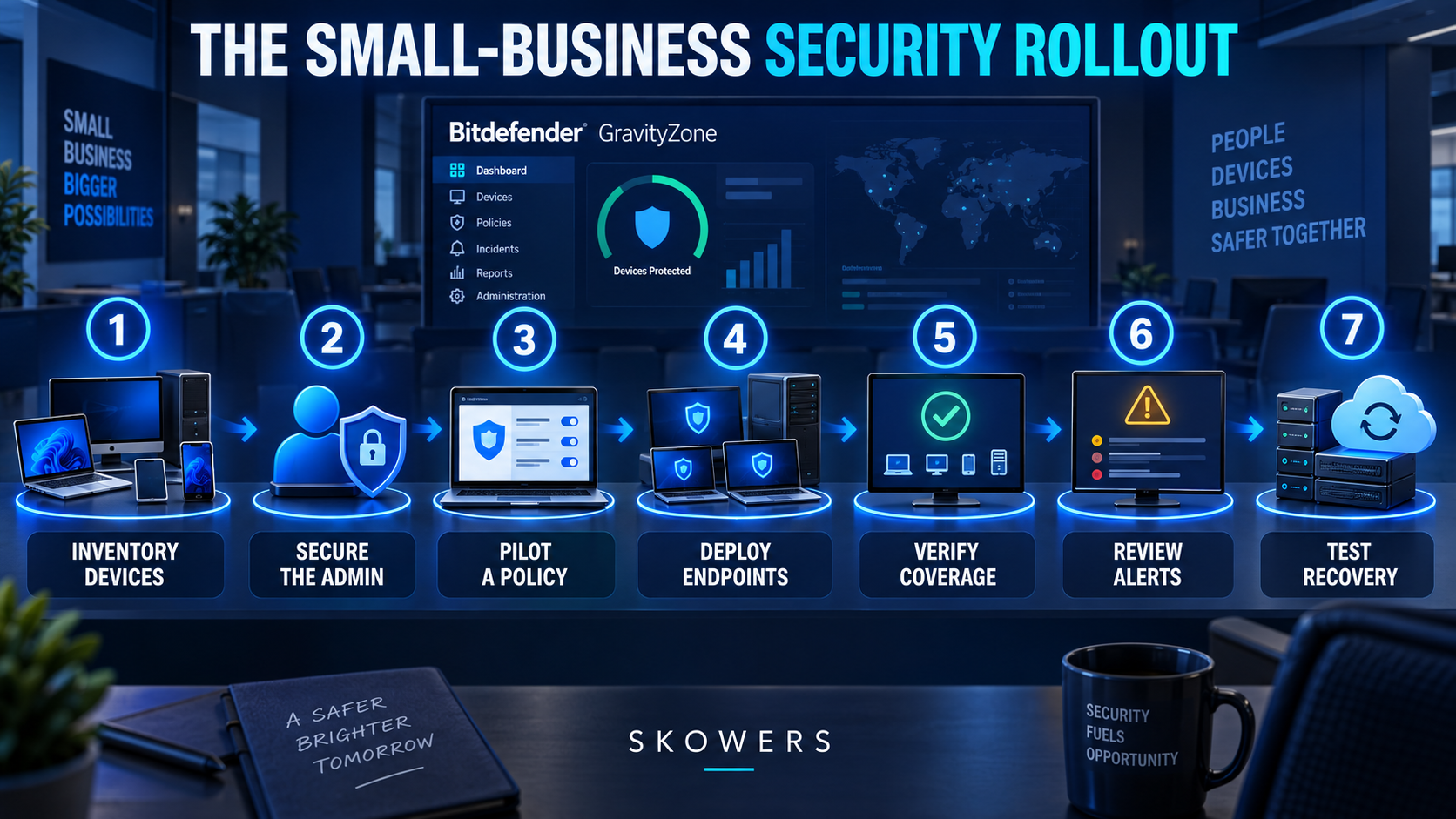
How to Deploy Bitdefender GravityZone Carefully
1. Inventory Every Device
Create a list of every laptop, desktop, and server that stores business information, accesses company accounts, or connects to the network. Record the owner, operating system, location, business purpose, and whether the device is actively used.
Include remote workers and machines that are rarely online. An old computer with valid credentials can still create risk.
Licensing commonly depends on the number and type of protected endpoints. Confirm how servers and optional device categories count under the current plan.
2. Secure the GravityZone Administrator
The management console controls policies across the business, so its account deserves stronger protection than an ordinary login.
Use a unique password stored in a reputable password manager. Enable multifactor authentication. Give administrative access only to people who need it, and create separate accounts rather than sharing one login.
Document who receives security notifications and who can make policy changes. Remove access promptly when responsibilities change.
3. Create a Pilot Group
Do not deploy a new security policy to every device at once. Bitdefender’s own guidance recommends trying new features on a limited set of endpoints.
Choose a small pilot group that represents the environment. Include a standard employee laptop, a remote device, a machine running important business software, and a server only when the server policy has been reviewed carefully.
Run the pilot long enough to identify compatibility issues, blocked applications, performance concerns, and alerts that need tuning.
4. Build the Installation Package and Policy
GravityZone uses installation packages to deploy the endpoint security agent. Select only the modules supported by the license and appropriate for the device group.
Begin with the vendor’s recommended baseline. Avoid disabling protection simply because an alert is inconvenient. Investigate the cause, confirm the application is legitimate, and make the narrowest possible exception.
Broad folder, process, or website exclusions can create holes that attackers learn to exploit.
5. Deploy in Controlled Waves
After the pilot is stable, expand deployment by department, location, or device type. Keep a record of completed and failed installations.
A sent installation link does not prove that a device is protected. Verify that each endpoint appears in the console, has received the intended policy, is updated, and has checked in recently.
Use the Skowers Bitdefender setup guide alongside the current official documentation when planning the rollout. When you are ready to evaluate the live product, open the Bitdefender trial path.
6. Tune Notifications Before They Become Noise
Alerts are useful only when someone reads and understands them. Decide which events require immediate attention, which belong in a daily review, and which can be summarized weekly.
Assign an owner and a backup owner. A critical alert sent to an unmonitored mailbox is not a response plan.
Track repeated detections, disabled protection, outdated endpoints, failed updates, suspicious network activity, and devices that stop checking in.
7. Test Recovery
A blocked attack is a success. A recoverable business is the larger goal.
Maintain backups that are isolated from ordinary user access. Test restoring several representative files and, where practical, a full system. Record how long recovery takes and which credentials, keys, or people are required.
Do not wait for ransomware to discover that the backup account was compromised, the archive was incomplete, or nobody knows the restoration procedure.
Security Works in Layers
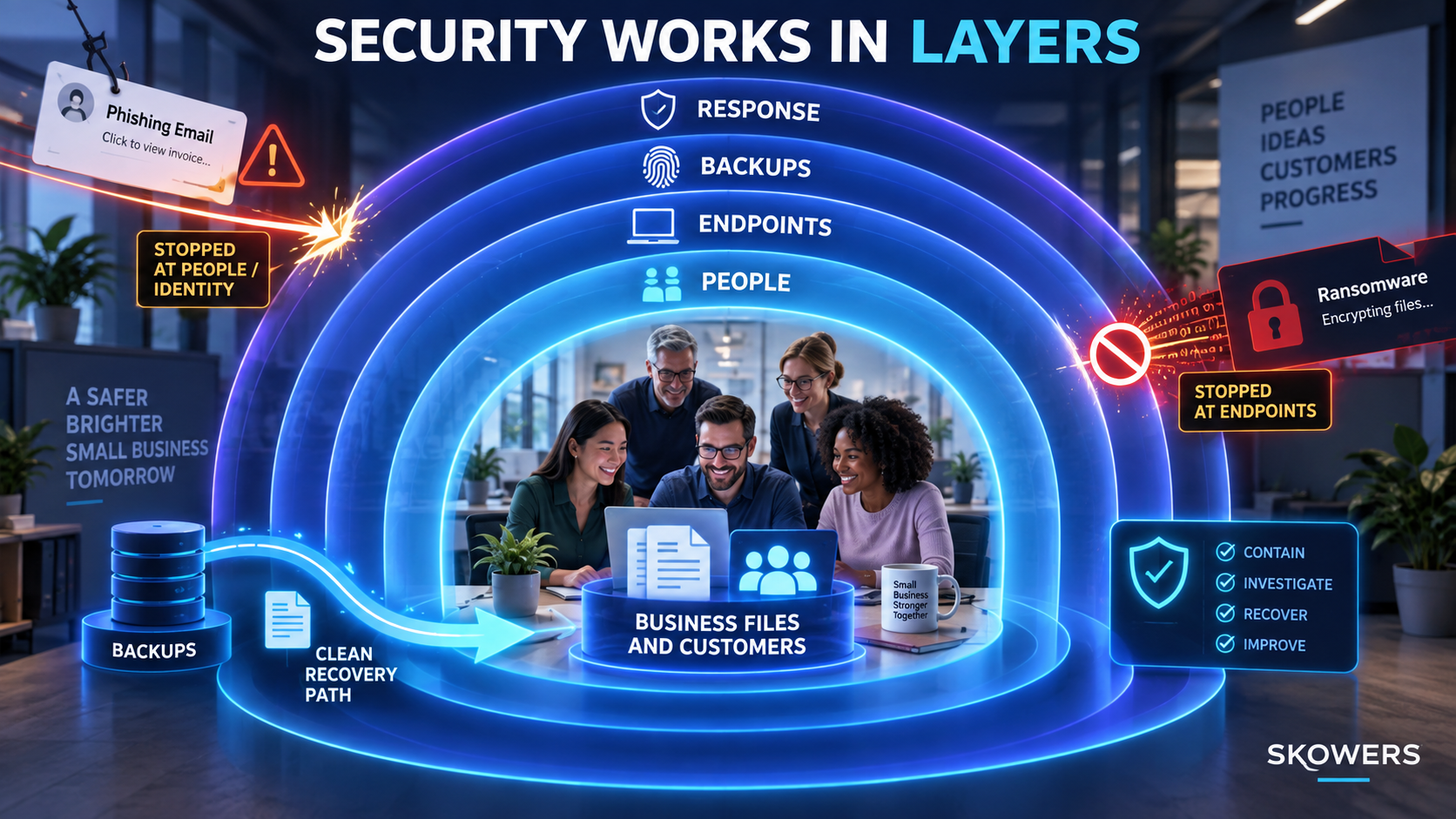
Bitdefender protects endpoints, but the business still needs controls around those endpoints.
People
Teach employees how to report suspicious emails, unexpected login prompts, unusual payment requests, and security warnings. Reward fast reporting. Hiding a mistake gives an attacker more time.
Identity
Use unique passwords and multifactor authentication, especially for email, cloud storage, finance, domain management, and the GravityZone console. Limit administrator privileges and review access regularly.
Endpoints
Keep protection installed, updated, and visible in the console. Apply policies based on device risk rather than convenience alone.
Backups
Keep versioned backups that ransomware cannot easily reach using the same credentials as the infected machine. Test actual restoration.
Response
Write down who isolates a device, who contacts customers or legal counsel, who restores systems, and who preserves evidence. During an incident, a short usable checklist is better than a large plan nobody can find.
What to Do When Bitdefender Shows an Alert
First, do not immediately delete every trace or click through the warning. Read what was detected, which endpoint was involved, what action Bitdefender took, and whether the event is still active.
Use this response order:
- Confirm scope. Identify the user, device, time, detection, and affected account or file.
- Contain risk. Isolate the endpoint when compromise may still be active.
- Protect credentials. Reset exposed passwords from a known-clean device and revoke active sessions when appropriate.
- Preserve useful evidence. Keep event details and relevant logs before wiping or rebuilding a system.
- Remove persistence. Follow verified remediation guidance and involve qualified support when the impact is unclear.
- Recover safely. Restore only from a known-clean backup and confirm the entry point is closed.
- Learn from the event. Update policies, access, training, and procedures based on what actually happened.
If the incident involves regulated information, financial loss, customer data, or ongoing unauthorized access, involve qualified security, legal, insurance, and law-enforcement resources as appropriate. A directory article cannot replace incident-specific professional guidance.
Bitdefender and Ransomware Protection
Ransomware defense is not one feature. It is a chain of prevention, detection, containment, and recovery.
Bitdefender GravityZone can detect malicious behavior, stop suspicious processes, quarantine threats, and provide ransomware mitigation in supported configurations. Network attack defense can also help identify attack techniques such as brute-force attempts and lateral movement.
Those controls reduce risk, but they do not make backups optional. Ransomware operators may steal information before encrypting it, compromise cloud accounts, or target backups. The business should plan for both data restoration and possible data exposure.
The most useful ransomware exercise is simple. Assume one employee laptop and a shared folder become unavailable today. Can the company isolate the device, continue essential work, restore clean files, reset credentials, and notify the right people without improvising every step?
Bitdefender and Phishing Protection
GravityZone’s web and content controls can block malicious sites, files, scripts, and phishing attempts before they reach the user. That is valuable because many attacks begin with a legitimate-looking message that sends someone to a fake login page.
Technical filtering still needs human habits:
- Open important services from a saved bookmark rather than an email link.
- Verify unusual payment or password requests through another channel.
- Inspect the full sender address, not only the display name.
- Treat unexpected multifactor prompts as a warning.
- Report suspicious messages instead of forwarding them widely.
- Never let urgency override verification for money or credentials.
Phishing training should teach a short response, not make employees memorize every possible scam.
Protecting Remote and Hybrid Teams
Remote endpoints may rarely touch the office network, which makes cloud-based visibility important. Confirm that each remote device checks in, receives policy updates, and can be isolated or investigated when needed.
Separate business and personal use where possible. Avoid local administrator access for daily work. Require screen locks, disk encryption where appropriate, supported operating systems, and secure home routers.
Create a clear lost-device process. Employees should know whom to contact, which accounts may need session revocation, and what information the device could access.
Common Bitdefender Deployment Mistakes
Assuming Installation Equals Coverage
An agent can be missing, outdated, disabled, or assigned the wrong policy. Verify status in the console.
Creating Broad Exclusions
Large exclusions may silence false positives while also creating an unmonitored path. Make exceptions narrow, documented, reviewed, and temporary when possible.
Ignoring Servers and Shared Systems
Servers require deliberate policy and licensing decisions. Do not treat them exactly like employee laptops without checking workload and support requirements.
Turning On Every Module Immediately
More controls can create conflicts and alert noise when deployed without testing. Pilot first and expand based on evidence.
Letting Alerts Accumulate
A console full of unread warnings creates the appearance of control without the practice of response. Define ownership and review cadence before deployment is complete.
Treating Endpoint Security as a Backup
Prevention can fail. Backups need separate protection, version history, and restoration tests.
Who Is Bitdefender a Good Fit For?
Bitdefender GravityZone can be a strong fit for a small or growing business that needs centralized protection across several endpoints and wants more visibility than separate consumer antivirus installations provide.
It is particularly relevant when the business:
- Handles customer, employee, financial, or operational data
- Supports remote or hybrid workers
- Has no full-time security team
- Needs consistent policies across multiple devices
- Wants ransomware, phishing, and network attack defenses in one managed platform
- Needs risk visibility and a repeatable endpoint security process
It may be more platform than a solo user needs for one personal computer. Organizations with complex compliance duties, active threats, or limited internal expertise may need a managed security provider or dedicated incident-response support in addition to the software.
Questions to Ask During the Bitdefender Trial
Use a trial to evaluate the full operating burden, not only whether the agent installs.
- Does every supported endpoint appear correctly in the console?
- Can administrators quickly identify an unprotected or outdated device?
- Do normal business applications continue working under the policy?
- Are alerts understandable and routed to an accountable person?
- Can the team investigate and contain a test event safely?
- Which features require another license or add-on?
- How are servers counted and protected?
- What happens when a remote device is offline for several days?
- Can reports support the company’s insurance or compliance needs?
- How will the organization get help during a real incident?
Document the answers before the trial ends. To begin that evaluation, use the Skowers Bitdefender partner link, then track what worked rather than relying on the demo.
Frequently Asked Questions
Is Bitdefender good for a small business?
It can be a good fit when a business needs centralized endpoint management, ransomware and phishing defenses, risk visibility, and consistent policies across multiple devices. The right edition depends on endpoint count, server needs, operating systems, and required add-ons.
What is the difference between Bitdefender consumer security and GravityZone?
Consumer products focus on protecting personal devices. GravityZone is built for centrally managing business endpoints, policies, alerts, risk, and administrative access across an organization.
Does Bitdefender protect against ransomware?
GravityZone includes layered detection and ransomware protection capabilities, including behavioral monitoring and mitigation features in supported configurations. No product guarantees complete prevention, so tested backups and an incident plan remain essential.
Does Bitdefender block phishing websites?
GravityZone web and content protection can block malicious and phishing destinations. Employees should still verify unusual login and payment requests because attackers constantly change their methods.
Can Bitdefender protect remote workers?
Yes, supported endpoints can be managed through GravityZone even when staff work outside the office. Administrators should verify check-ins, updates, policy assignment, and lost-device procedures.
Does Bitdefender replace employee security training?
No. Software can block many threats, but people still handle unexpected messages, payment requests, passwords, and sensitive information. Training and simple reporting procedures remain necessary.
Does Bitdefender replace backups?
No. Endpoint protection and ransomware mitigation reduce risk, but independent, versioned, tested backups are still required for resilient recovery.
How should a business test Bitdefender?
Start with a limited pilot group, verify device coverage, test ordinary applications, tune alerts, confirm feature licensing, and run a safe recovery exercise before expanding deployment.
The Bottom Line
Bitdefender GravityZone can give a small business strong endpoint protection and a central view of devices, policies, risk, and security events. Its ransomware, phishing, behavioral, and network defenses address threats that commonly reach growing teams.
The product creates the most value when it becomes part of a disciplined routine. Inventory every endpoint. Protect the administrator account. Pilot policies. Verify deployment. Review alerts. Maintain isolated backups. Test recovery.
For product details and fit, visit the Bitdefender overview on Skowers. For a setup-focused companion, use the Bitdefender GravityZone guide. When you are ready to test it with representative devices and workflows, start through the Skowers Bitdefender link.
Related Articles

Continue Your Research