
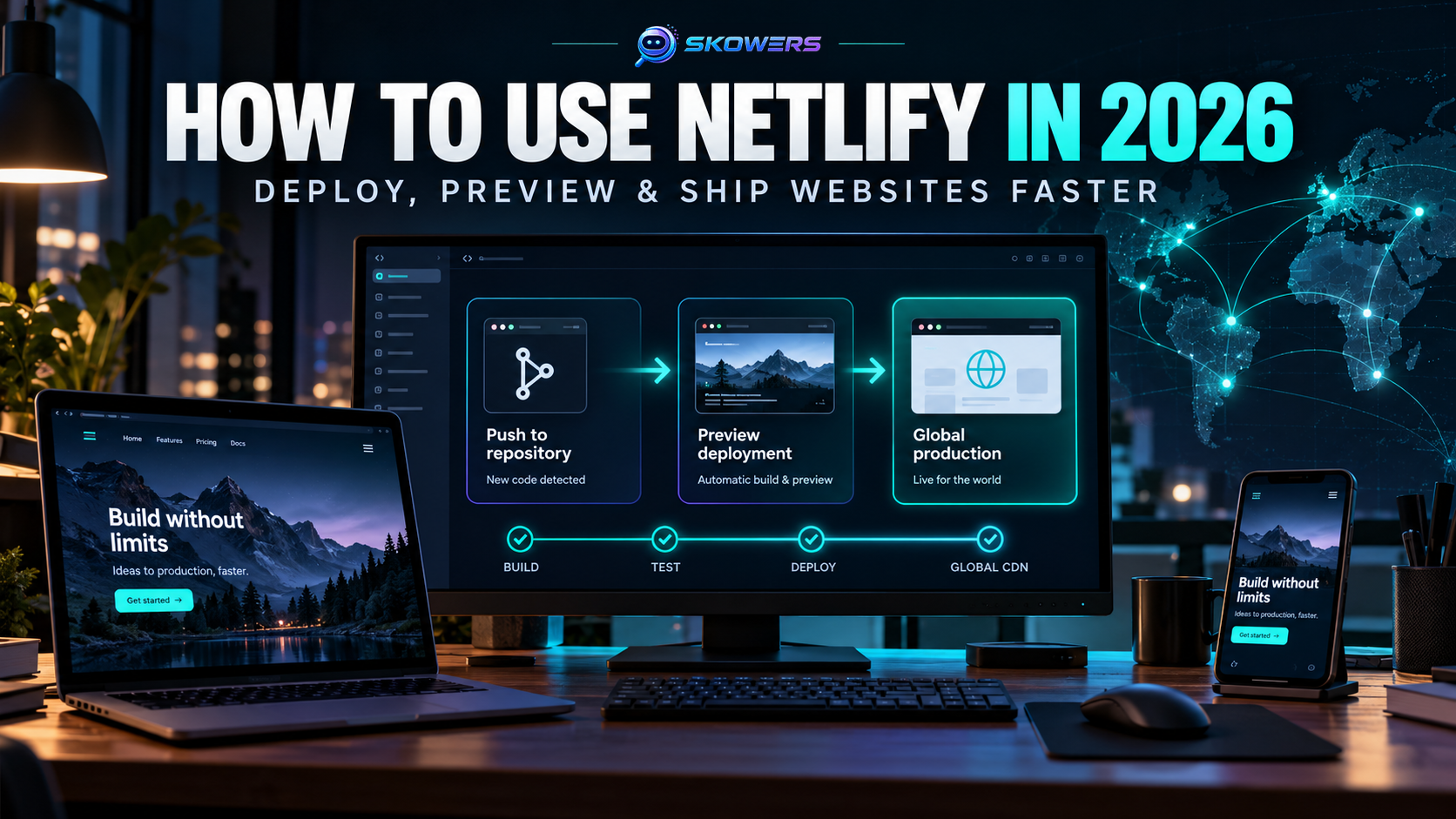
How to Use Netlify in 2026: Deploy, Preview, and Launch Websites Faster
Listen: How to Use Netlify in 2026: Deploy, Preview, and Launch Websites Faster
Publishing a website should not require a full infrastructure team.
Netlify is a web development platform that takes a project from source code to a live website. It can connect to a Git repository, run the build, publish the finished site through a global delivery network, create previews for proposed changes, manage domains and HTTPS, and add server-side features when a project needs more than static pages.
That makes it useful for personal sites, business websites, landing pages, documentation, ecommerce frontends, and modern web applications. It is especially helpful when a founder, marketer, designer, or small development team wants a dependable publishing workflow without managing servers.
This guide explains how to use Netlify from the first deployment through a careful production launch. It also covers the mistakes that commonly break builds, expose secrets, waste usage credits, or send unfinished work live.
Last reviewed October 20, 2026. Netlify features, plan limits, and credit rates can change. Confirm current details before choosing a paid plan.
Skowers may earn a commission from partner links in this article at no additional cost to you. The guide is written around practical fit and includes links to official documentation where details change frequently.
What Netlify Does
Netlify connects the parts of modern website delivery that are often handled separately.
- It receives code from Git, an API, or an AI-assisted workflow.
- It installs dependencies and runs the project's build command.
- It publishes the generated site or application.
- It creates a unique preview for proposed changes.
- It serves production traffic through a global CDN.
- It manages HTTPS certificates and custom domains.
- It can run Functions, Edge Functions, forms, storage, and other application features.
- It keeps previous deploys available for rollback.
The simple version is this: your repository becomes a repeatable publishing system.
You can explore the full Skowers listing on the Netlify tool page, use the existing Netlify setup guide, or start with Netlify through the Skowers partner link.
Who Netlify Is Best For
Netlify is a strong fit when a project uses a modern frontend framework or produces static web files during a build.
Common fits include:
- Next.js, Astro, React, Vue, Nuxt, Gatsby, Remix, and similar frontend projects
- Static HTML, CSS, and JavaScript sites
- Marketing sites and campaign landing pages
- Documentation and knowledge bases
- Headless CMS websites
- Portfolios and small business sites
- Frontends that call an external API or database
- Projects that benefit from review links before publication
Netlify is less suitable when the project depends on a traditional server that must remain running continuously, requires deep operating-system control, or uses infrastructure that cannot fit its supported runtime model. A legacy application built around a long-running custom server may need a virtual machine, container host, or a platform designed for that architecture.
Before You Start
You need three things for the cleanest workflow:
- A working website project.
- A repository on GitHub, GitLab, Bitbucket, or another supported provider.
- A clear understanding of the build command and output folder.
The build command tells Netlify how to turn source files into a production site. Examples include npm run build or another framework-specific command.
The publish directory is where the finished files appear. Different frameworks use different outputs. A static project might publish a dist folder. Another framework may use an adapter that configures the deployment automatically.
Do not guess these values repeatedly. Check the framework documentation and the local build output first.
Step 1: Create the Netlify Account
Use the Skowers Netlify partner link to create or access the account.
The current Free plan is designed for experimenting and smaller projects. Netlify's official pricing page currently describes Git, API, and AI deployment, custom domains with SSL, Deploy Previews, Functions, storage, and CDN delivery under a monthly credit allowance. Review the current Netlify pricing page before relying on a specific limit.
Choose a workspace name that represents the business or project rather than a temporary experiment. Clean workspace ownership matters later when collaborators, billing, and domains are added.
Step 2: Connect the Repository
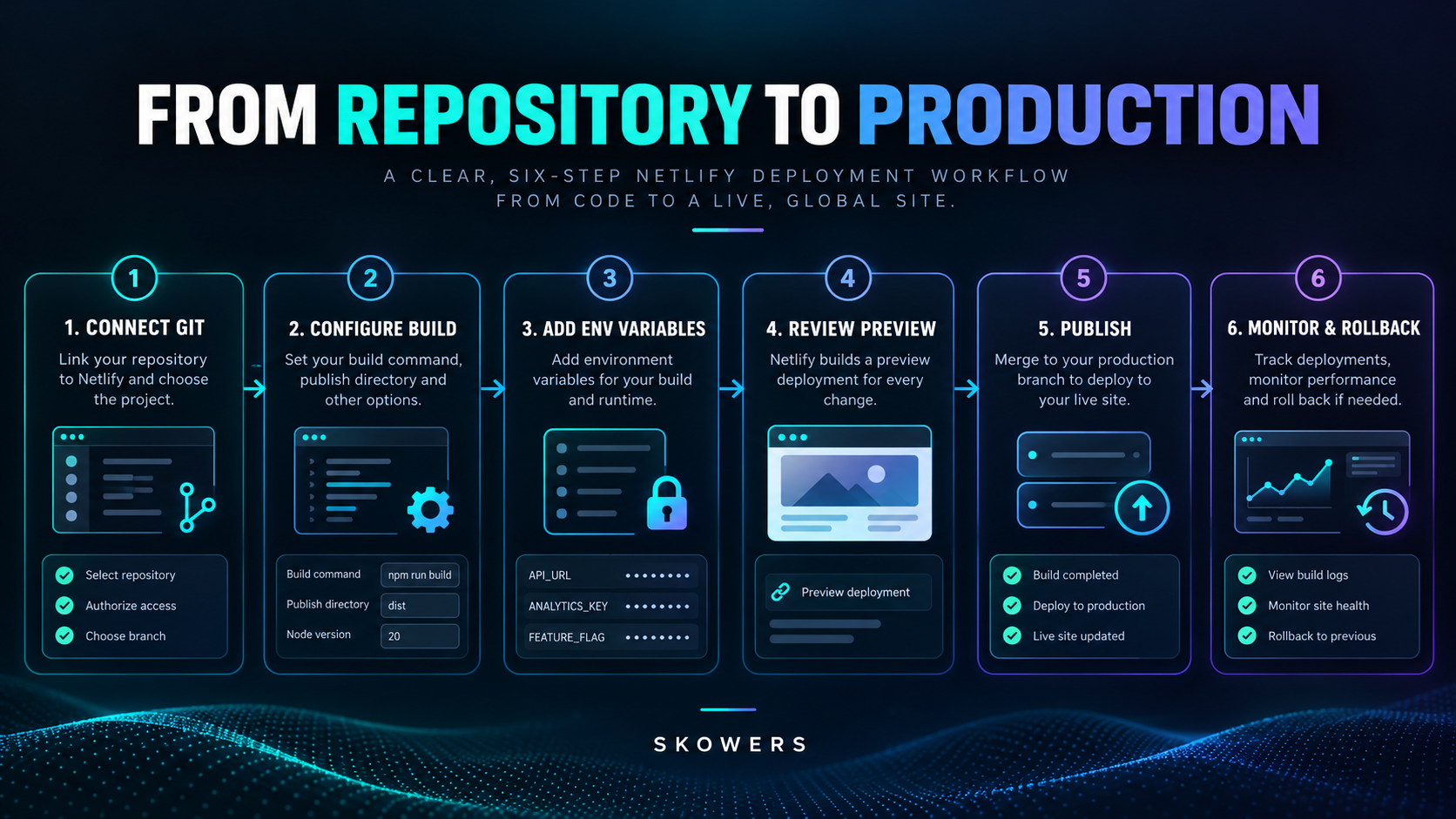
From Netlify, create a new project and choose the option to import an existing repository.
Authorize only the repositories Netlify needs. Broad account access is convenient, but narrower access is easier to audit.
Then select the repository and confirm:
- Production branch
- Base directory if the project lives inside a larger repository
- Build command
- Publish directory
- Framework detection
The production branch is usually main. A deploy from that branch becomes the public production version unless the project is configured differently.
Step 3: Configure the First Build
Netlify often detects popular frameworks automatically, but automatic detection should still be reviewed.
Check these settings:
Build command
This must complete successfully without interactive input. Run the same production build locally before blaming the hosting platform.
Publish directory
This must point to the actual build output. A successful build with an empty or incorrect publish directory can produce a blank site or a 404.
Runtime version
The Node.js or framework version should match the version used locally and in the repository. Version drift causes avoidable dependency and build errors.
Package manager
Commit the correct lockfile. Mixing package managers can produce different dependency trees between a laptop and the hosted build.
Base directory
Monorepos need special attention. Confirm which folder owns the application and which folder contains the package manifest.
When the first deploy succeeds, Netlify provides a temporary Netlify address. Use it for verification before attaching the final domain.
Step 4: Protect Environment Variables and API Keys
Environment variables hold configuration that should not be hardcoded into source files. Examples include API keys, database URLs, CMS tokens, analytics identifiers, and service credentials.
Add sensitive values through Netlify's environment-variable controls rather than committing them to Git.
Netlify supports different values for production, Deploy Previews, branches, and local development. This is useful when a preview should connect to test data instead of a production database.
The official environment variables documentation explains scopes, contextual values, shared variables, site variables, and sensitive-variable policies.
Important rules:
- Never place a private secret in browser-exposed code.
- Never commit a real secret to a public repository.
- Use a separate test key for previews when possible.
- Limit each key to the permissions the application needs.
- Rotate a secret immediately if it appears in a deploy log or repository history.
- Trigger a fresh deploy after changing variables that are read during the build.
A value stored securely on Netlify can still become public if the application deliberately bundles it into client-side JavaScript. The application architecture must keep secrets on the server side.
Step 5: Use Deploy Previews Before Publishing
Deploy Previews are one of Netlify's most useful collaboration features.
When a pull or merge request is opened for a connected repository, Netlify can build the proposed version at a unique URL. The team can inspect the real website without merging it into production.
Use a preview to check:
- Desktop and mobile layout
- Navigation and internal links
- Forms and conversion paths
- Metadata and social images
- Accessibility basics
- Content accuracy
- Analytics behavior
- Performance
- Changes that depend on environment variables
Netlify says Deploy Previews are automatically created for supported pull requests and can use environment values specific to that preview context. Read the current Deploy Previews documentation for visibility, indexing, password protection, and URL behavior.
Do not treat a green build as editorial approval. It proves that the project compiled. It does not prove that the page is accurate, usable, or ready for customers.
Review this Deploy Preview as a release candidate.
Check: 1. Every visible navigation link 2. Mobile layout at narrow width 3. Forms, buttons, and conversion paths 4. Page title, description, canonical URL, and social preview 5. Missing images and image alt text 6. Console errors and failed network requests 7. Content claims that need human verification 8. Any environment-specific behavior
Return a launch-blocking list first, then lower-priority improvements. Do not approve publication based only on appearance.
Step 6: Add a Custom Domain and HTTPS
Connect the domain only after the temporary site works correctly.
The exact DNS records depend on whether Netlify manages DNS or the domain remains with another provider. Follow the values shown for the specific project rather than copying records from an unrelated tutorial.
After DNS updates:
- Confirm the preferred domain resolves.
- Confirm HTTPS is active.
- Choose whether the www or root version is canonical.
- Redirect the secondary version to the preferred version.
- Test on a network or device that has not cached the old DNS result.
- Confirm email DNS records remain intact if the domain also handles email.
DNS changes can take time to propagate. Avoid making several conflicting changes while waiting.
Step 7: Add Netlify Functions When the Site Needs Server Logic
A static website can still need secure server-side behavior.
Netlify Functions can handle jobs such as:
- Secure form processing
- Calling an API without exposing a private key
- Sending transactional email
- Creating a checkout session
- Receiving webhooks
- Processing authenticated requests
- Connecting a frontend to protected services
Functions are not an excuse to place every task in one large endpoint. Keep each function focused, validate input, restrict permissions, handle errors, and log enough information to troubleshoot safely.
Netlify's current Functions guide explains local testing, continuous deployment, logs, and framework-specific setup.
Step 8: Use Redirects and Rewrites Carefully
Redirects move visitors and search engines from one URL to another. Rewrites can serve different content without changing the visible URL.
Useful cases include:
- Redirecting an old page after a URL change
- Sending www traffic to the preferred domain
- Supporting client-side application routes
- Proxying a request to a controlled backend
- Preserving a campaign URL
Use permanent redirects only when the move is actually permanent. Test rules in a preview before publishing because a broad redirect can make an entire site inaccessible.
For SEO migrations, maintain a one-to-one map from old URLs to their closest new equivalents. Sending every removed page to the homepage creates a poor visitor experience and weak search signals.
Step 9: Understand Deploy Contexts
Netlify separates production, Deploy Preview, branch, preview-server, and local development contexts.
This allows a team to change behavior safely by environment. For example:
- Production uses live CMS content and payment credentials.
- Deploy Previews use a test CMS and sandbox payment account.
- A staging branch enables debugging information.
- Local development uses local or temporary services.
The official deploy overview explains how build settings and environment values can vary by context.
Context separation protects production only when the credentials and data are genuinely separated. Giving every environment the same production key defeats the purpose.
Step 10: Monitor Usage and Costs
Netlify's current plans use credits across several platform activities. The Free plan currently has a hard monthly allowance, while paid plans provide larger allowances and additional options. Pricing changes over time, so use the platform dashboard and official pricing documentation rather than an old screenshot.
Watch for:
- Unexpected traffic spikes
- Repeated or unnecessary builds
- Large unoptimized images and downloads
- Functions that run too often or too long
- Bots repeatedly requesting expensive routes
- Preview environments left active without a reason
- A production loop that triggers new deploys continuously
The right question is not only whether Netlify is free today. It is whether the project's traffic, build frequency, compute, and team workflow fit the plan predictably.
How to Roll Back a Bad Deployment
Every team eventually publishes something incorrect.
Netlify keeps deploy history, which makes it possible to restore a previously working version quickly. A rollback reduces damage, but it does not remove the need to fix the source branch.
Use this sequence:
- Confirm the current production deploy caused the problem.
- Restore the last verified deploy.
- Notify the team that production was rolled back.
- Fix the source code or content in a new branch.
- Review the new Deploy Preview.
- Merge only after the original failure is understood.
Do not make several unreviewed production changes while trying to diagnose one failure.
Common Netlify Build Errors
The build works locally but fails on Netlify
Check runtime versions, environment variables, filename capitalization, ignored files, lockfiles, and operating-system differences. A file import that works on a case-insensitive computer can fail in a case-sensitive build environment.
The build succeeds but the site is blank
Confirm the publish directory and inspect browser errors. The built files may exist in a different folder, or the application may expect an environment value that was unavailable.
Refreshing an application route returns 404
A client-side application may need a rewrite so routes are served through its main document. Use the framework's Netlify integration or the recommended routing rule.
Images or assets are missing
Inspect absolute versus relative paths, capitalization, base paths, and whether the assets were committed to Git.
A secret is undefined
Confirm the variable name, scope, deploy context, and whether the project was redeployed after the value changed.
The domain does not resolve
Check authoritative DNS records, nameservers, duplicate records, and propagation. Avoid deleting email-related records while editing website DNS.
Netlify SEO Checklist
Hosting alone does not optimize a website for search. The site must still provide strong technical and editorial signals.
Before launch, confirm:
- Every important page has a unique title and description.
- Each public URL has the correct canonical tag.
- The production domain is used in sitemap and structured data URLs.
- robots.txt allows important pages to be crawled.
- Deploy Previews and staging pages are not indexed.
- The XML sitemap is reachable and submitted to search engines.
- Images have useful alt text and reasonable dimensions.
- Redirects preserve old search traffic during migrations.
- Pages return the correct status codes.
- Core content is available to search engines without a broken client-side request.
- Structured data matches what visitors can see.
- Mobile layout and performance are acceptable.
Netlify states that Deploy Previews include a noindex response header, but teams should still review project visibility and preview protection for confidential work.
The Netlify Go-Live Checklist
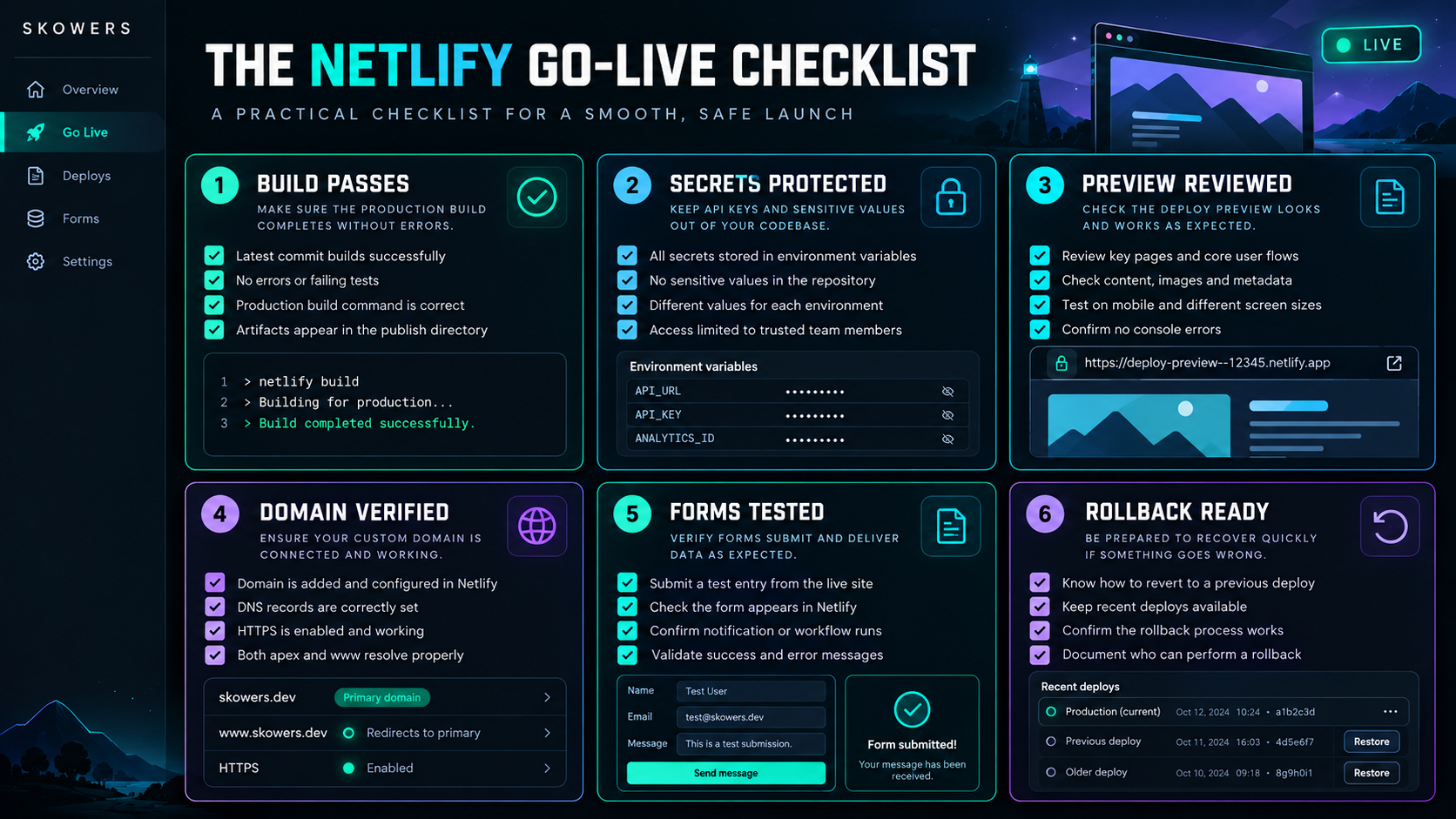
- Production build completes without errors.
- The correct branch and publish directory are configured.
- Secrets are stored outside the repository.
- Preview-specific services do not use production data unnecessarily.
- A human reviewed the latest Deploy Preview.
- Forms and server-side Functions were tested.
- Custom domain and HTTPS work correctly.
- Canonical URLs, sitemap, robots rules, and social previews use the production domain.
- Analytics and consent behavior were verified.
- The team knows how to identify and restore a previous deploy.
Project: [name] Production branch: [branch] Build command: [command] Publish directory: [directory] Runtime version: [version] Preview reviewed by: [person] Environment separation confirmed: [yes/no] Custom domain and HTTPS confirmed: [yes/no] Forms and Functions tested: [yes/no/not used] SEO metadata checked: [yes/no] Accessibility check completed: [yes/no] Rollback deploy identified: [yes/no] Known launch risks: [list] Go-live decision: [approve/hold]
A Practical First Project
The best way to learn Netlify is to deploy a small real project.
Try this sequence:
- Create a one-page business or portfolio site.
- Store it in a Git repository.
- Create Netlify through the Skowers partner link.
- Import the repository.
- Verify the build and publish settings.
- Open the temporary site URL.
- Create a small content change on a separate branch.
- Review the Deploy Preview.
- Merge the approved change.
- Add a custom domain only after the workflow is reliable.
If building the website is the harder part, start with How to Build a Website With AI, then use Netlify as the deployment and review layer.
Explore Netlify on Skowers

Frequently Asked Questions
Is Netlify good for beginners?
Yes, especially when the website already works locally and uses a supported framework or static build. Beginners still need to understand repositories, builds, environment variables, and domains. Netlify simplifies deployment but does not eliminate those concepts.
Can I host a website on Netlify for free?
Netlify currently offers a Free plan with a monthly credit allowance and a hard limit. It is suitable for learning and smaller experiments. Check the current pricing page because usage rules and included features can change.
Does Netlify work with Next.js?
Yes. Netlify supports Next.js, but framework versions and features evolve. Use the current Netlify framework guidance and test the production build and preview behavior before migration.
Does Netlify include a database?
Current Netlify plans advertise database and storage capabilities alongside Functions and AI-related platform features. Whether they fit depends on the application's data model, region, scale, and portability needs. Do not choose a database solely because it is available from the host.
Are Netlify environment variables secure?
They are designed to keep configuration outside the source repository and support scopes and contexts. Security still depends on permissions and application design. A secret becomes public if code sends it to the browser.
What is a Netlify Deploy Preview?
It is a separate hosted version of proposed changes, commonly created from a pull or merge request. It allows review before the code becomes production.
Can Netlify host an AI-generated website?
Yes, if the generated project uses a compatible framework or produces deployable web files. Review the code, dependencies, accessibility, security, and licensing before publishing. AI-generated code still requires human verification.
Is Netlify only for static sites?
No. Static delivery remains a major strength, but Functions, Edge Functions, framework integrations, storage, forms, and other services support more dynamic applications.
When should I choose another platform?
Choose another host when the application requires infrastructure control, a permanently running custom server, specialized networking, unsupported runtimes, or a cost model that fits another provider better.
The Bottom Line
Netlify is valuable because it turns deployment into a visible, repeatable workflow.
Connect the repository. Make the build deterministic. Protect secrets. Review every important change through a Deploy Preview. Separate production from test environments. Attach the domain only after the temporary site works. Monitor credits and keep a rollback path ready.
That process matters more than pressing a deploy button.
For the quickest path, start Netlify through Skowers, review the Netlify directory listing, and keep the shorter Netlify setup guide nearby while configuring the first project.
Related Articles



Continue Your Research